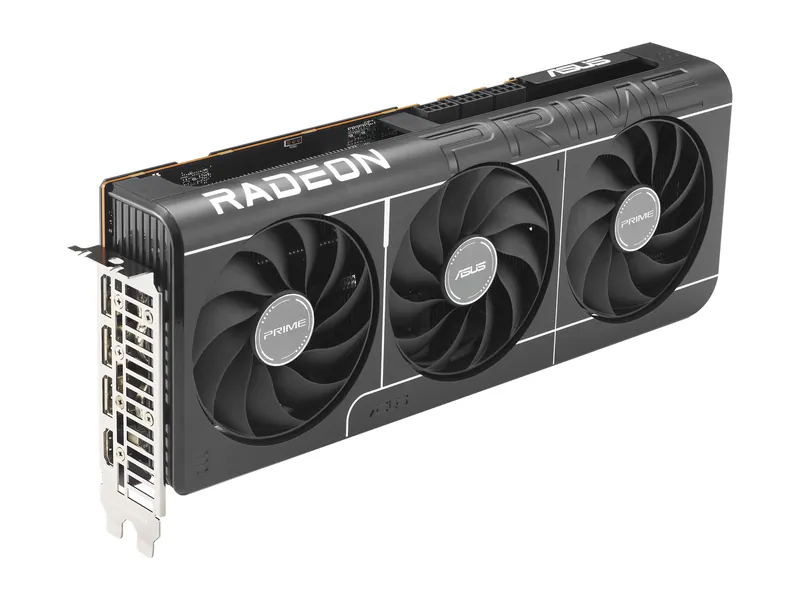
Best 1440p and entry 4K raster pick
RX 9070 XT (ASUS Prime)
You prioritize raster gaming and 16GB, and your case fits 312 mm with three approved PCIe 8-pin connections and ASUS 750W PSU guidance.
RX 9070 XT · 16GB GDDR6 · 256-bit · 2.5-slot

1080p: RX 9060 XT. 1440p: RX 9070. Entry 4K: RX 9070 XT or RTX 5070 Ti.
7picks
We may earn a commission when you buy through our links. As an Amazon Associate I earn from qualifying purchases. Affiliate disclosure
Quick List · Above the Fold
RX 9070 XT · 16GB GDDR6 · 256-bit · 2.5-slot
RTX 5070 Ti · 16GB GDDR7 · 256-bit · 3.125-slot
RTX 5070 Ti · 16GB GDDR7 · 256-bit · 2.5-slot
RTX 5070 Ti · 16GB GDDR7 · 256-bit · 2.5-slot
RX 9070 (not XT) · 16GB GDDR6 · 256-bit · 2.5-slot
RTX 5070 · 12GB GDDR7 · 192-bit · 2.5-slot
RX 9060 XT · 16GB GDDR6 · 128-bit · 2.5-slot
2026 GPU Benchmarks Hierarchy · Research-Based · Not Lab-Tested
Filter 12 desktop GPUs across Tier S, Tier A, Tier B, and Tier C by target resolution, architecture, and VRAM capacity. Frame-rate averages reference the published Tom's Hardware GPU Benchmarks Hierarchy alongside official NVIDIA, AMD, and Intel board power specifications.
| Tier & Rank | GPU Chip & Best Role | VRAM & Memory Bus | Published 1440p Ultra Consensus | Board Power & PSU Fit | Compare Retailers |
|---|---|---|---|---|---|
Tier S#01 4K Flagship | NVIDIA GeForce RTX 5090Blackwell · GB202 Uncompromised 4K & Path Tracing | 32GB VRAM32GB GDDR7 · 512-bit · 1,792 GB/s | Raster: 162.4 fps avg (Tom's Hierarchy) Ray Tracing: 118.5 fps avg (Tom's Hierarchy) | 575W TGP · 1× 16-pin (12V-2x6) ⚡ Min 1000W ATX 3.1 → | |
Tier S#02 4K High-Refresh | NVIDIA GeForce RTX 5080Blackwell · GB203 4K DLSS 4 & High-Refresh 1440p | 16GB VRAM16GB GDDR7 · 256-bit · 960 GB/s | Raster: 131.2 fps avg (Tom's Hierarchy) Ray Tracing: 79.4 fps avg (Tom's Hierarchy) | 360W TGP · 1× 16-pin (12V-2x6) ⚡ Min 850W ATX 3.1 → | |
Tier A#03 1440p Ultra / 4K | NVIDIA GeForce RTX 5070 TiBlackwell · GB203 Best for Ray Tracing & DLSS 4 | 16GB VRAM16GB GDDR7 · 256-bit · 896 GB/s | Raster: 116.8 fps avg (Tom's Hierarchy) Ray Tracing: 66.2 fps avg (Tom's Hierarchy) | 300W TGP · 1× 16-pin (12V-2x6) ⚡ Min 750W ATX 3.1 → | |
Tier A#04 1440p Ultra / 4K | AMD Radeon RX 9070 XTRDNA 4 · Navi 48 XT Top 1440p Raster Value Pick | 16GB VRAM16GB GDDR6 · 256-bit · 640 GB/s | Raster: 116.5 fps avg (Tom's Hierarchy) Ray Tracing: 55.5 fps avg (Tom's Hierarchy) | 304W TBP · 2–3× 8-pin PCIe ⚡ Min 750W ATX 3.1 → | |
Tier A#05 Efficient 1440p 16GB | AMD Radeon RX 9070RDNA 4 · Navi 48 XL Best Low-Power 16GB 1440p Card | 16GB VRAM16GB GDDR6 · 256-bit · 640 GB/s | Raster: 103.8 fps avg (Tom's Hierarchy) Ray Tracing: 48.2 fps avg (Tom's Hierarchy) | 220W TBP · 2× 8-pin PCIe ⚡ Min 650W ATX 3.1 → | |
Tier B#06 Mainstream 1440p | NVIDIA GeForce RTX 5070Blackwell · GB205 Best Midrange DLSS 4 Option | 12GB VRAM12GB GDDR7 · 192-bit · 672 GB/s | Raster: 100.8 fps avg (Tom's Hierarchy) Ray Tracing: 52.9 fps avg (Tom's Hierarchy) | 250W TGP · 1× 16-pin (12V-2x6) ⚡ Min 650W–750W → | |
Tier B#07 Previous-Gen 1440p | NVIDIA GeForce RTX 4070 SuperAda Lovelace · AD104 220W Drop-In 1440p Alternative | 12GB VRAM12GB GDDR6X · 192-bit · 504 GB/s | Raster: 96.4 fps avg (Tom's Hierarchy) Ray Tracing: 49.8 fps avg (Tom's Hierarchy) | 220W TGP · 1× 16-pin ⚡ Min 650W ATX 3.0+ → | |
Tier B#08 Previous-Gen 16GB | AMD Radeon RX 7800 XTRDNA 3 · Navi 32 Proven 16GB 1440p Raster Workhorse | 16GB VRAM16GB GDDR6 · 256-bit · 624 GB/s | Raster: 89.7 fps avg (Tom's Hierarchy) Ray Tracing: 36.1 fps avg (Tom's Hierarchy) | 263W TBP · 2× 8-pin PCIe ⚡ Min 700W → | |
Tier C#09 Budget 16GB / 1080p Ultra | AMD Radeon RX 9060 XT 16GBRDNA 4 · Navi 44 Best Budget 16GB Graphics Card | 16GB VRAM16GB GDDR6 · 128-bit · 320 GB/s | Raster: 68.6 fps avg (Tom's Hierarchy) Ray Tracing: 29.2 fps avg (Tom's Hierarchy) | 160W TBP · 1× 8-pin PCIe ⚡ Min 550W → | |
Tier C#10 1080p Ultra / DLSS 4 | NVIDIA GeForce RTX 5060 Ti 16GBBlackwell · GB206 Compact 16GB Card with DLSS 4 | 16GB VRAM16GB GDDR7 · 128-bit · 448 GB/s | Raster: 71.2 fps avg (Tom's Hierarchy) Ray Tracing: 36.8 fps avg (Tom's Hierarchy) | 180W TGP · 1× 8-pin or 16-pin ⚡ Min 600W → | |
Tier C#11 Entry 1080p Value | Intel Arc B580 12GBBattlemage · BMG-G21 Entry 1080p / Light 1440p with 12GB | 12GB VRAM12GB GDDR6 · 192-bit · 456 GB/s | Raster: 56.4 fps avg (Tom's Hierarchy) Ray Tracing: 24.5 fps avg (Tom's Hierarchy) | 190W TBP · 1–2× 8-pin PCIe ⚡ Min 600W → | |
Tier C#12 Entry 1080p 16GB | AMD Radeon RX 7600 XT 16GBRDNA 3 · Navi 33 1080p Card with 16GB VRAM Buffer | 16GB VRAM16GB GDDR6 · 128-bit · 288 GB/s | Raster: 51.8 fps avg (Tom's Hierarchy) Ray Tracing: 19.4 fps avg (Tom's Hierarchy) | 190W TBP · 2× 8-pin PCIe ⚡ Min 600W → |
Methodology & Source Attribution: 1440p Ultra raster and ray-tracing averages are cited from the published Tom's Hardware GPU Benchmarks Hierarchy; TGP/TBP, connector types, and PSU ratings come from official NVIDIA GeForce, AMD Radeon, and Intel Arc datasheets. Research-based · not lab-tested.
| Resolution tier | Exact board and verdict | VRAM / bus | Power connector | Board PSU guidance |
|---|---|---|---|---|
| Tier S / 4K flagship | No flagship board in this shortlist; consider the entry 4K picks if you can adjust settings | No flagship pick | Check exact flagship board | Check exact flagship board |
| Tier 1 / 4K entry & 1440p Ultra 16GB | ASUS Prime RX 9070 XT: raster pick | 16GB GDDR6 / 256-bit | 3× 8-pin | 750W |
| Tier 1 / 4K entry & 1440p Ultra 16GB | ASUS TUF RTX 5070 Ti: heavy RT and DLSS pick here | 16GB GDDR7 / 256-bit | 1× 16-pin / 12V-2x6 cabling | 850W |
| Tier 1 / 4K entry & 1440p Ultra 16GB | ASUS Prime RTX 5070 Ti: 2.5-slot alternative | 16GB GDDR7 / 256-bit | 1× 16-pin / 12V-2x6 cabling | 750W |
| Tier 1 / smaller-case alternative | GIGABYTE RTX 5070 Ti WINDFORCE SFF 16G: 304 mm | 16GB GDDR7 / 256-bit | 1× 16-pin / 12V-2x6 cabling | 750W |
| Tier 2 / efficient 1440p 16GB | ASUS Prime RX 9070: lower reference power | 16GB GDDR6 / 256-bit | 2× 8-pin | 650W |
| Tier 3 / mainstream 1440p 12GB | ASUS Prime RTX 5070: DLSS option | 12GB GDDR7 / 192-bit | 1× 16-pin / 12V-2x6 cabling | 750W |
| Tier 4 / 1080p Ultra & budget 16GB | ASUS Prime RX 9060 XT 16GB: entry 1440p | 16GB GDDR6 / 128-bit | 1× 8-pin | 550W |
PSU figures are manufacturer recommendations for these exact boards, not measured system draw or universal minimums. The ASUS Prime RTX 5070 uses ASUS’s 750W guidance; NVIDIA’s GPU-level 650W guidance is different. Retailer availability can change.
Start with the interactive GPU + PSU ATX 3.1 wattage and case clearance calculator, then check board-specific limits below. The embedded calculator uses approximate reference classes, not these exact seven boards; its estimate does not override their manufacturer requirements.
These tiers are editorial use cases for seven boards across five GPU models, not a claim that one card wins every game. NVIDIA Blackwell and AMD RDNA 4 differ in rendering features as well as memory. Manufacturer specifications establish fit and power connections; published third-party benchmarks establish the performance references. The Hardware Pick has not benchmarked these retail boards.
Tier S is reserved for flagship-class 4K hardware, such as NVIDIA’s RTX 5090. RTX 5080 also sits above the RTX 5070 Ti in NVIDIA’s stack. Neither has a board recommendation here. Do not read the highest shortlisted tier as the fastest GPU available.
The wider desktop stack is mapped below for context. Only the seven shortlisted retail boards have purchase recommendations here; a GPU family name does not identify a board’s cooler, cabling or retailer listing.
| Tier / GPU | Architecture | Memory / bus / bandwidth | 1440p Ultra raster / RT reference, fps | Reference TGP or TBP |
|---|---|---|---|---|
| 1 / RTX 5070 Ti, all three boards | Blackwell | 16GB GDDR7 / 256-bit / 896 GB/s | 116.8 / 66.2 | 300W NVIDIA TGP |
| 1 / RX 9070 XT | RDNA 4 | 16GB GDDR6 / 256-bit / 640 GB/s | 116.5 / 55.5 | 304W AMD TBP |
| 2 / RX 9070 | RDNA 4 | 16GB GDDR6 / 256-bit / 640 GB/s | Not recorded in this catalog entry | 220W AMD TBP |
| 3 / RTX 5070 | Blackwell | 12GB GDDR7 / 192-bit / 672 GB/s | 96.4 / 51.5 | 250W NVIDIA TGP |
| 4 / RX 9060 XT 16GB | RDNA 4 | 16GB GDDR6 / 128-bit / 320 GB/s | 67.3 / 31.0 | 160W AMD TBP |
The fps pairs are the Tom’s Hardware 1440p Ultra raster and ray-tracing suite averages recorded in the product catalog. They describe GPU-level reference results, not a measured difference between ASUS TUF, ASUS Prime and GIGABYTE coolers. Raster and RT use different workloads; compare within each column. Generated-frame output is not interchangeable with these references.
Bandwidth is theoretical: memory data rate × bus width ÷ eight. The RX 9070’s 20 Gbps and 256-bit interface yield 640 GB/s. It has the lowest reference board power among the shortlisted 16GB 256-bit GPUs; that alone does not prove the best performance per watt. NVIDIA TGP and AMD TBP are vendor reference definitions, not wall-power measurements of partner boards.
| Tier | 4K Ultra | 1440p high-refresh | 1080p Ultra |
|---|---|---|---|
| S / flagship context | Start here for more 4K headroom; no board pick here | Check CPU limits before buying flagship hardware | Usually investigate the CPU and monitor first |
| 1 / RTX 5070 Ti and RX 9070 XT | Entry 4K candidates; reduce effects or use supported upscaling as needed | Strong shortlist; game-specific fps still matters | Check whether your existing GPU already meets the target |
| 2 / RX 9070 | Adjust settings; 16GB alone cannot guarantee Ultra performance | Lower-power 16GB candidate; check your games’ results | Suitable use case when you also want a later 1440p upgrade |
| 3 / RTX 5070 | 12GB and effects can constrain settings | Mainstream option with supported DLSS features | Check base frame rate and CPU limits |
| 4 / RX 9060 XT 16GB | Choose a higher tier for demanding Ultra workloads | Entry 1440p; reduce settings for higher refresh | Primary target for this shortlist’s entry tier |
Resolution targets are judgments, not frame-rate guarantees. For a close Tier 1 decision, read RTX 5070 Ti vs RX 9070 XT. For Tier 2 versus Tier 3, read RTX 5070 vs RX 9070.
These additional models fill out the Blackwell and RDNA 4 desktop families around the five shortlisted GPUs. The resolution roles are editorial starting points, not measured rankings between every model. Memory variants stay separate because capacity can change the settings a game can use.
| GPU / role | Architecture | Memory / bus | Reference GPU power / power input guidance |
|---|---|---|---|
| RTX 5090: Tier S flagship 4K | Blackwell | 32GB GDDR7 / 512-bit | 575W TGP / 16-pin via approved native cable or adapter |
| RTX 5080: upper 4K | Blackwell | 16GB GDDR7 / 256-bit | 360W TGP / 16-pin via approved native cable or adapter |
| RTX 5060 Ti 16GB: entry 1440p context | Blackwell | 16GB GDDR7 / 128-bit | 180W TGP / 8-pin or PCIe Gen 5 cable, board dependent |
| RTX 5060 Ti 8GB: capacity-limited alternative | Blackwell | 8GB GDDR7 / 128-bit | 180W TGP / 8-pin or PCIe Gen 5 cable, board dependent |
| RTX 5060: 1080p context | Blackwell | 8GB GDDR7 / 128-bit | 145W TGP / 8-pin or PCIe Gen 5 cable, board dependent |
| RTX 5050: entry 1080p context | Blackwell | 8GB GDDR6 / 128-bit | 130W TGP / 8-pin or PCIe Gen 5 cable, board dependent |
| RX 9070 GRE: 1440p context | RDNA 4 | 12GB GDDR6 / 192-bit / 432 GB/s | 220W TBP / 2× 8-pin reference guidance |
| RX 9060 XT 8GB: 1080p context | RDNA 4 | 8GB GDDR6 / 128-bit / 320 GB/s | 150W TBP / confirm partner board inputs |
| RX 9060: 1080p system context | RDNA 4 | 8GB GDDR6 / 128-bit / 288 GB/s | 132W TBP / 1× 8-pin reference guidance |
No catalog benchmark averages are recorded here for these additional models. Use the linked manufacturers for specifications and the published hierarchy for game results. None of these context rows establishes an in-stock retail pick. At 4K, check per-game memory use and rendering results before treating an 8GB or 12GB option as a substitute for a higher tier.
Reasons to Buy
Reasons to Skip
Reasons to Buy
Reasons to Skip
Reasons to Buy
Reasons to Skip
Reasons to Buy
Reasons to Skip
Reasons to Buy
Reasons to Skip
Reasons to Buy
Reasons to Skip
Reasons to Buy
Reasons to Skip
16GB gives texture-heavy games and mods more capacity than 12GB. It cannot guarantee how long a GPU will meet your target: rendering throughput, settings and future game requirements also matter. The RX 9060 XT’s 16GB does not make it a faster 4K card than an RTX 5070 with 12GB.
RTX 50-series supports DLSS 4 Multi Frame Generation in compatible games. Radeon RX 9000 supports FSR 4 upscaling in compatible games. Check upscaling and frame generation separately in your actual library; neither is automatic support for every game. Generated frames can improve displayed smoothness without matching the input response of the same frame rate rendered conventionally. For heavy ray tracing, prioritize a usable base frame rate before enabling frame generation.
| Exact board | Manufacturer dimensions | PSU guidance | Board connection |
|---|---|---|---|
| ASUS Prime RX 9070 XT | 312 × 130 × 50 mm; 2.5 slots | 750W | 3× PCIe 8-pin |
| ASUS TUF RTX 5070 Ti | 329 × 140 × 62.5 mm; 3.125 slots | 850W | 1× 16-pin |
| ASUS Prime RTX 5070 Ti | 304 × 126 × 50 mm; 2.5 slots | 750W | 1× 16-pin |
| GIGABYTE RTX 5070 Ti WINDFORCE SFF 16G | 304 × 126 × 50 mm | 750W | 1× 16-pin |
| ASUS Prime RX 9070 | 312 × 130 × 50 mm; 2.5 slots | 650W | 2× PCIe 8-pin |
| ASUS Prime RTX 5070 | 304 × 126 × 50 mm; 2.5 slots | 750W | 1× 16-pin |
| ASUS Prime RX 9060 XT 16GB | 304 × 126 × 50 mm; 2.5 slots | 550W | 1× PCIe 8-pin |
The GIGABYTE specification identifies GV-N507TWF3-16GD as 304 mm long. A 261 mm requirement would exclude it, regardless of the SFF branding. Check front fans, radiator intrusion, slot thickness, support brackets and side-panel cable room. Card length and connector bending clearance are different measurements.
For a new RTX build, an appropriate ATX 3.1 PSU with a manufacturer-approved native 12V-2x6 cable can simplify cabling. ASUS lists these RTX boards with a 16-pin input. Follow GPU and PSU instructions for the exact cable or included adapter, full seating and routing; never substitute a modular cable from another PSU without explicit compatibility. Radeon boards use the specified number of PCIe 8-pin inputs. PSU wattage alone does not establish cable compatibility.
The RX 9060 XT figure above is AMD’s 160W reference TBP, not a measurement of the overclocked ASUS board. Follow ASUS’s exact-board specifications and 550W guidance for system planning.
Match the tier to your display with our best 1440p gaming monitors. Before replacing an older card, follow the upgrade an old gaming PC plan: a CPU, cooling or display limit can leave a faster GPU underused.
Use the graphics-card buying guide for the broader decision. If you are waiting for an unannounced generation, read our RTX 6060 release-date rumor and buy-or-wait guidance; a rumor is not a confirmed launch schedule.
16GB leaves more capacity for demanding textures and mods. Choose it when your games need that headroom, but compare GPU performance too. A 12GB RTX 5070 can suit 1440p with adjusted settings; neither 12GB nor 16GB guarantees 4K Ultra or future compatibility.
Choose for the games and rendering features you use. RTX 50-series supports DLSS Multi Frame Generation, while these Radeon cards support FSR 4 upscaling in compatible titles. Check the game’s current implementation, base frame rate, artifacts and input response before comparing generated-frame counters.
Use the exact board’s PSU recommendation and the complete system requirements. ASUS recommends 850W for the TUF RTX 5070 Ti and 750W for the selected Prime RTX boards. The calculator estimates system demand; it does not certify a PSU or replace manufacturer instructions for the 16-pin cable.
Only after measuring. This GIGABYTE WINDFORCE SFF 16G is 304 × 126 × 50 mm, not 261 mm. Compare usable length after fans and radiators, available slots, card height and cable routing with the exact model’s drawing.
It is the highest NVIDIA GPU in this shortlist, but RTX 5080 and RTX 5090 sit above it. Treat Tier 1 as entry 4K and strong 1440p territory; demanding ray-traced 4K may need reduced settings or upscaling. No flagship retail board is recommended on this page.
You prioritize raster gaming and 16GB, and your case fits 312 mm with three approved PCIe 8-pin connections and ASUS 750W PSU guidance.
RX 9070 XT · 16GB GDDR6 · 256-bit · 2.5-slot
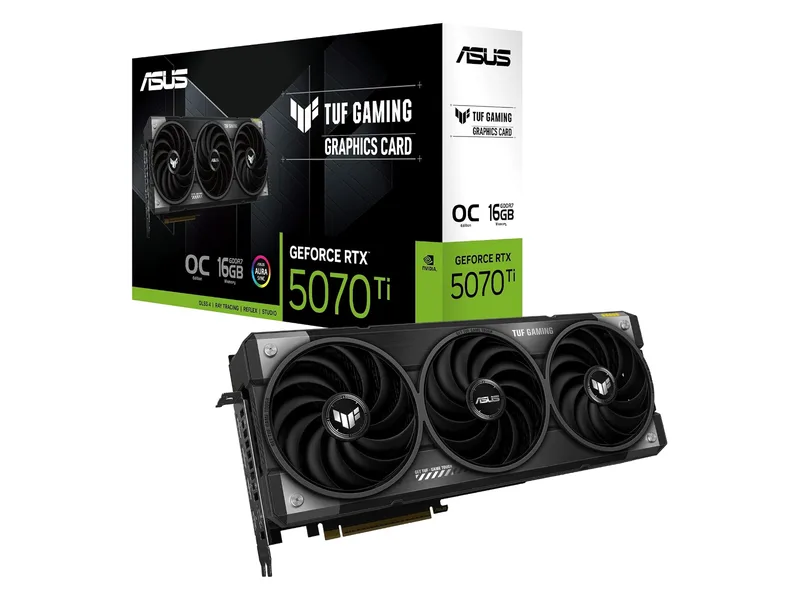
Your games support DLSS 4 Multi Frame Generation and you can fit the 329 mm, 3.125-slot TUF board with a 16-pin cable and ASUS 850W PSU guidance.
RTX 5070 Ti · 16GB GDDR7 · 256-bit · 3.125-slot
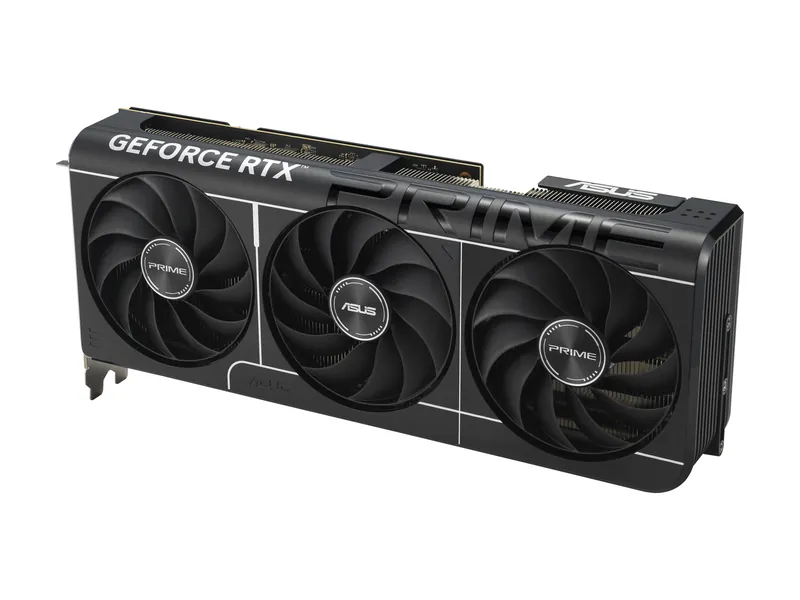
You want RTX 5070 Ti features and 16GB in a 304 mm, 2.5-slot ASUS board with a 16-pin cable and ASUS 750W PSU guidance.
RTX 5070 Ti · 16GB GDDR7 · 256-bit · 2.5-slot
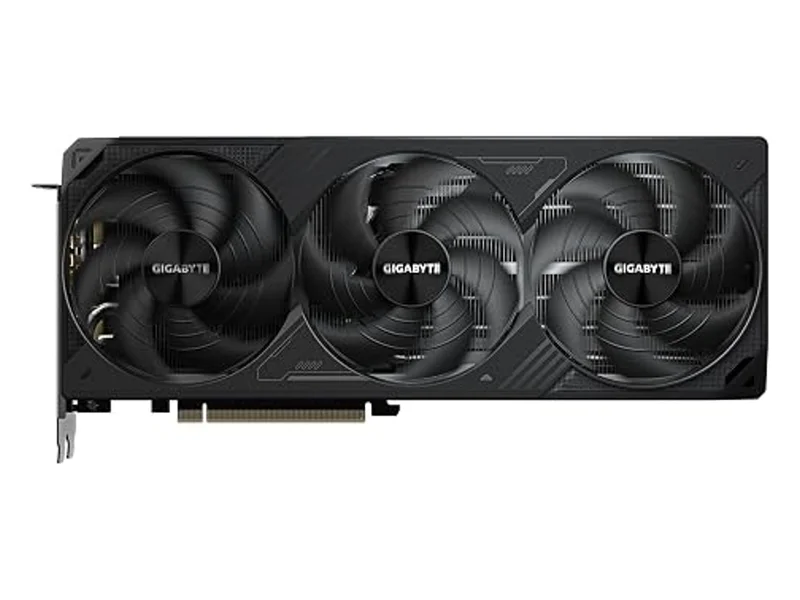
You want 16GB GDDR7 and RTX 5070 Ti features in the 304 × 126 × 50 mm GIGABYTE board, with a 16-pin cable and 750W PSU guidance.
RTX 5070 Ti · 16GB GDDR7 · 256-bit · 2.5-slot
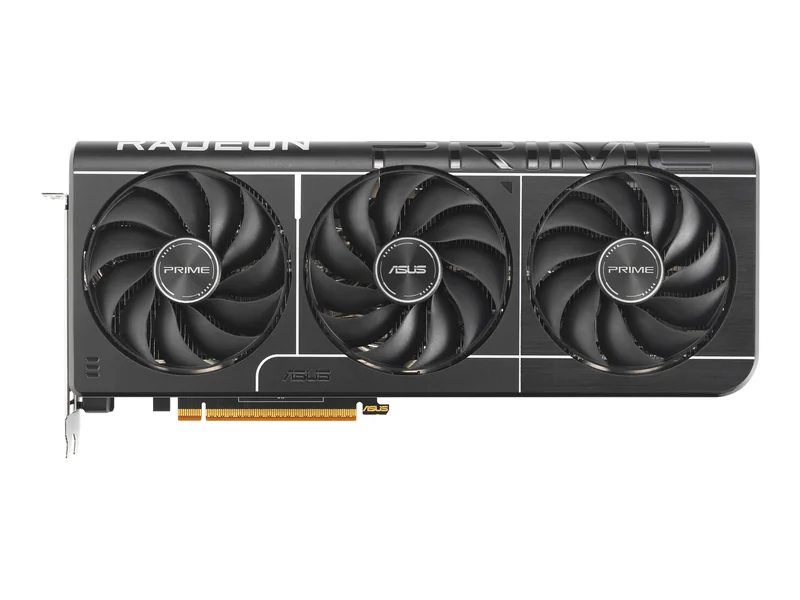
You want 16GB for 1440p with 220W AMD reference power, and your system meets ASUS 650W guidance with two 8-pin connections.
RX 9070 (not XT) · 16GB GDDR6 · 256-bit · 2.5-slot
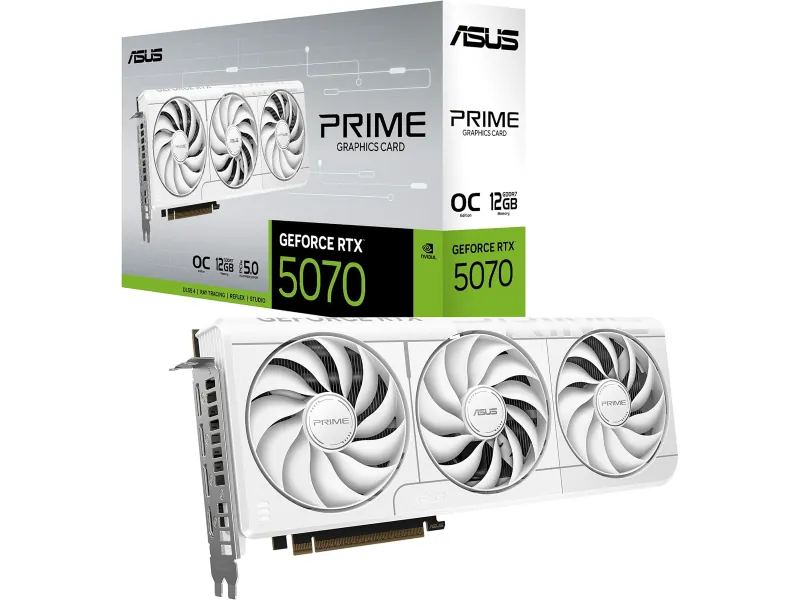
You play supported DLSS games at 1440p and accept 12GB, a 304 mm board, one 16-pin connection and ASUS 750W PSU guidance.
RTX 5070 · 12GB GDDR7 · 192-bit · 2.5-slot
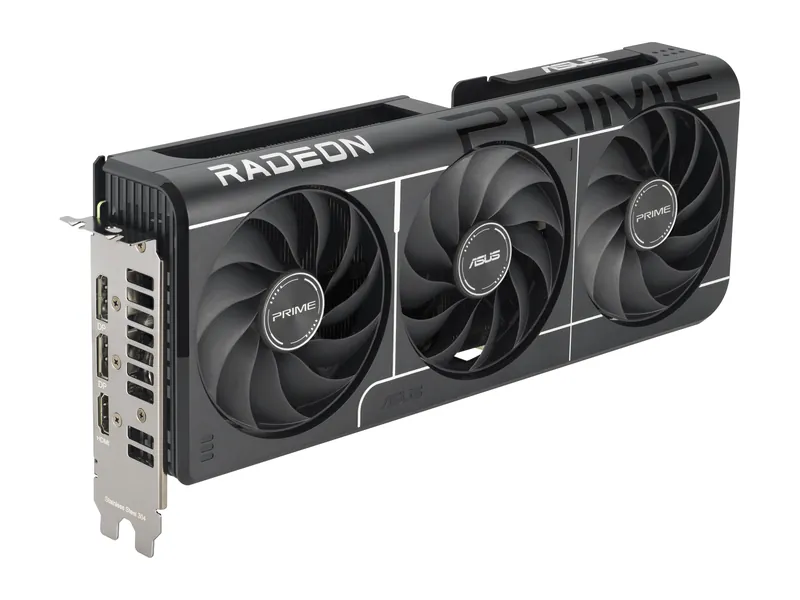
You want 16GB for 1080p and adjusted 1440p settings, with one 8-pin connection and ASUS 550W PSU guidance.
RX 9060 XT · 16GB GDDR6 · 128-bit · 2.5-slot
ASUS Prime Radeon RX 9070 XT OC Edition 16GB · 1 of 7
RX 9070 XT · 16GB GDDR6 · 256-bit · 2.5-slot
Get it if You prioritize raster gaming and 16GB, and your case fits 312 mm with three approved PCIe 8-pin connections and ASUS 750W PSU guidance.
Skip it if You need a specific NVIDIA feature, heavy ray tracing is your priority, or your PSU cannot supply the required three 8-pin connections.
You prioritize raster gaming and 16GB, and your case fits 312 mm with three approved PCIe 8-pin connections and ASUS 750W PSU guidance.
RX 9070 XT · 16GB GDDR6 · 256-bit · 2.5-slot
| GPU | AMD Radeon RX 9070 XT · 64 compute units (AMD) |
|---|---|
| VRAM | 16GB GDDR6 · 256-bit · 640 GB/s (AMD) |
| Memory bandwidth | 640 GB/s (AMD) |
| Boost clock | Up to 3030 MHz in OC mode (ASUS) |
| Board power | 304W total board power (AMD reference) |
| Power connectors | 3× 8-pin (ASUS) |
| Recommended PSU | 750W (ASUS) |
| Size | 312 × 130 × 50 mm · 2.5 slots (ASUS) |
| Outputs | 1× HDMI 2.1b · 3× DisplayPort 2.1a (ASUS) |
| Launch MSRP (GPU) | See the linked launch source. |
ASUS TUF Gaming GeForce RTX 5070 Ti 16GB GDDR7 OC Edition · 2 of 7
RTX 5070 Ti · 16GB GDDR7 · 256-bit · 3.125-slot
Get it if Your games support DLSS 4 Multi Frame Generation and you can fit the 329 mm, 3.125-slot TUF board with a 16-pin cable and ASUS 850W PSU guidance.
Skip it if Your case lacks room for 329 mm plus cable clearance, your PSU falls short of the board guidance, or your games do not use its NVIDIA features.
Your games support DLSS 4 Multi Frame Generation and you can fit the 329 mm, 3.125-slot TUF board with a 16-pin cable and ASUS 850W PSU guidance.
RTX 5070 Ti · 16GB GDDR7 · 256-bit · 3.125-slot
| GPU | NVIDIA GeForce RTX 5070 Ti · 8,960 CUDA cores (NVIDIA) |
|---|---|
| VRAM | 16GB GDDR7 · 256-bit (NVIDIA) |
| Memory bandwidth | 896 GB/s (28 Gbps × 256-bit, ASUS/NVIDIA) |
| Boost clock | 2610 MHz in OC mode (ASUS) |
| Board power | 300W total graphics power (NVIDIA) |
| Power connectors | 1× 16-pin (ASUS) |
| Recommended PSU | 850W (ASUS) |
| Size | 329 × 140 × 62.5 mm · 3.125 slots (ASUS) |
| Outputs | 2× HDMI 2.1b · 3× DisplayPort 2.1b (ASUS) |
| Launch MSRP (GPU) | See the linked launch source. |
ASUS Prime GeForce RTX 5070 Ti OC Edition 16GB · 3 of 7
RTX 5070 Ti · 16GB GDDR7 · 256-bit · 2.5-slot
Get it if You want RTX 5070 Ti features and 16GB in a 304 mm, 2.5-slot ASUS board with a 16-pin cable and ASUS 750W PSU guidance.
Skip it if You need more than 16GB, cannot fit 304 mm plus cable clearance, or cannot supply compatible 16-pin power.
You want RTX 5070 Ti features and 16GB in a 304 mm, 2.5-slot ASUS board with a 16-pin cable and ASUS 750W PSU guidance.
RTX 5070 Ti · 16GB GDDR7 · 256-bit · 2.5-slot
| GPU | NVIDIA GeForce RTX 5070 Ti · 8,960 CUDA cores (NVIDIA) |
|---|---|
| VRAM | 16GB GDDR7 · 256-bit (NVIDIA) |
| Memory bandwidth | 896 GB/s (28 Gbps × 256-bit, ASUS/NVIDIA) |
| Boost clock | 2527 MHz in OC mode (ASUS) |
| Board power | 300W total graphics power (NVIDIA) |
| Power connectors | 1× 16-pin (ASUS) |
| Recommended PSU | 750W (ASUS) |
| Size | 304 × 126 × 50 mm · 2.5 slots (ASUS) |
| Outputs | 1× HDMI 2.1b · 3× DisplayPort 2.1b (ASUS) |
| Launch MSRP (GPU) | See the linked launch source. |
GIGABYTE GeForce RTX 5070 Ti WINDFORCE SFF 16G · 4 of 7
RTX 5070 Ti · 16GB GDDR7 · 256-bit · 2.5-slot
Get it if You want 16GB GDDR7 and RTX 5070 Ti features in the 304 × 126 × 50 mm GIGABYTE board, with a 16-pin cable and 750W PSU guidance.
Skip it if Your case needs a card shorter than 304 mm. The SFF name alone does not establish fit, and this is not a 261 mm card.
You want 16GB GDDR7 and RTX 5070 Ti features in the 304 × 126 × 50 mm GIGABYTE board, with a 16-pin cable and 750W PSU guidance.
RTX 5070 Ti · 16GB GDDR7 · 256-bit · 2.5-slot
| GPU | NVIDIA GeForce RTX 5070 Ti · 8,960 CUDA cores (NVIDIA) |
|---|---|
| VRAM | 16GB GDDR7 · 256-bit (NVIDIA) |
| Memory bandwidth | 896 GB/s (28 Gbps × 256-bit, GIGABYTE/NVIDIA) |
| Boost clock | 2452 MHz core clock (GIGABYTE) |
| Board power | 300W total graphics power (NVIDIA) |
| Power connectors | 1× 16-pin (GIGABYTE) |
| Recommended PSU | 750W (GIGABYTE) |
| Size | 304 × 126 × 50 mm (GIGABYTE) |
| Outputs | 1× HDMI 2.1b · 3× DisplayPort 2.1b (GIGABYTE) |
| Launch MSRP (GPU) | See the linked launch source. |
ASUS Prime Radeon RX 9070 OC Edition 16GB · 5 of 7
RX 9070 (not XT) · 16GB GDDR6 · 256-bit · 2.5-slot
Get it if You want 16GB for 1440p with 220W AMD reference power, and your system meets ASUS 650W guidance with two 8-pin connections.
Skip it if You require DLSS or expect 16GB capacity alone to guarantee 4K Ultra frame rates.
You want 16GB for 1440p with 220W AMD reference power, and your system meets ASUS 650W guidance with two 8-pin connections.
RX 9070 (not XT) · 16GB GDDR6 · 256-bit · 2.5-slot
| GPU | AMD Radeon RX 9070 (not XT) · 3,584 stream processors (ASUS) |
|---|---|
| VRAM | 16GB GDDR6 · 256-bit · 20 Gbps (ASUS) |
| Boost clock | Up to 2610 MHz OC / 2590 MHz default (ASUS) |
| Board power | 220W typical board power (AMD reference) |
| Power connectors | 2× 8-pin (ASUS) |
| Recommended PSU | 650W for this card (ASUS) |
| Size | 312 × 130 × 50 mm · 2.5 slots (ASUS) |
| Outputs | 1× HDMI 2.1b · 3× DisplayPort 2.1a (ASUS) |
| Upscaling | FSR; support varies by game |
| Board fit | 312 × 130 × 50 mm · 2.5 slots · 2× 8-pin · PSU 650W (ASUS) |
ASUS Prime GeForce RTX 5070 OC Edition 12GB · 6 of 7
RTX 5070 · 12GB GDDR7 · 192-bit · 2.5-slot
Get it if You play supported DLSS games at 1440p and accept 12GB, a 304 mm board, one 16-pin connection and ASUS 750W PSU guidance.
Skip it if You need more VRAM for demanding textures, mods or 4K effects, or your complete system does not meet ASUS board requirements.
You play supported DLSS games at 1440p and accept 12GB, a 304 mm board, one 16-pin connection and ASUS 750W PSU guidance.
RTX 5070 · 12GB GDDR7 · 192-bit · 2.5-slot
| GPU | NVIDIA GeForce RTX 5070 · 6,144 CUDA cores (NVIDIA) |
|---|---|
| VRAM | 12GB GDDR7 · 192-bit (NVIDIA) |
| Memory bandwidth | 672 GB/s (28 Gbps × 192-bit, ASUS/NVIDIA) |
| Boost clock | 2587 MHz in OC mode (ASUS) |
| Board power | 250W total graphics power (NVIDIA) |
| Power connectors | 1× 16-pin (ASUS) |
| Recommended PSU | 750W for this card (ASUS; NVIDIA lists 650W for the chip) |
| Size | 304 × 126 × 50 mm · 2.5 slots (ASUS) |
| Outputs | 1× HDMI 2.1b · 3× DisplayPort 2.1b (ASUS) |
| Launch MSRP (GPU) | See the linked launch source. |
ASUS Prime Radeon RX 9060 XT OC Edition 16GB · 7 of 7
RX 9060 XT · 16GB GDDR6 · 128-bit · 2.5-slot
Get it if You want 16GB for 1080p and adjusted 1440p settings, with one 8-pin connection and ASUS 550W PSU guidance.
Skip it if You want high-refresh 1440p Ultra or heavy ray tracing without reducing settings. Extra VRAM does not replace GPU throughput.
You want 16GB for 1080p and adjusted 1440p settings, with one 8-pin connection and ASUS 550W PSU guidance.
RX 9060 XT · 16GB GDDR6 · 128-bit · 2.5-slot
| GPU | AMD Radeon RX 9060 XT · 32 compute units (AMD) |
|---|---|
| VRAM | 16GB GDDR6 · 128-bit (AMD) |
| Memory bandwidth | 320 GB/s (AMD) |
| Boost clock | Up to 3330 MHz in OC mode (ASUS) |
| Board power | 160W total board power (AMD reference) |
| Power connectors | 1× 8-pin (ASUS) |
| Recommended PSU | 550W (ASUS) |
| Size | 304 × 126 × 50 mm · 2.5 slots (ASUS) |
| Outputs | 1× HDMI 2.1b · 2× DisplayPort 2.1a (ASUS) |
| Launch MSRP (GPU) | See the linked launch source. |
Image credits: RX 9070 XT (ASUS Prime) — ASUS · RTX 5070 Ti (ASUS TUF) — ASUS (via Amazon) · RTX 5070 Ti (ASUS Prime) — ASUS · RTX 5070 Ti (GIGABYTE) — GIGABYTE (via Amazon) · RX 9070 OC 16GB (ASUS Prime) — ASUS · RTX 5070 (ASUS Prime) — ASUS (Amazon listing) · RX 9060 XT 16GB (ASUS Prime) — ASUS.
Estimate power using GPU/CPU classes, a 95W allowance for other parts and an illustrative 30% margin. Reference dimensions do not verify your exact card, cable space or complete PC. Check the sourced rig rules before ordering.
Estimated Combined System Peak: 617W (360W GPU + 162W CPU + 95W Board/NVMe/Fans) · 30% Headroom Target: 850W
Connector Requirement: Check the exact PSU cable and GPU installation instructions. Cable bend space is a separate check and remains UNKNOWN here.
Case Clearance Check: ESTIMATE (+45mm length margin): 355mm usable case length minus ~310mm reference length. Width, slots and cable clearance are UNKNOWN.
Confirm your email to receive the weekly hardware briefing and the printable 2026 PC Upgrade & GPU/PSU Checklist PDF.