Tier B+ · 850W native 12V-2x6
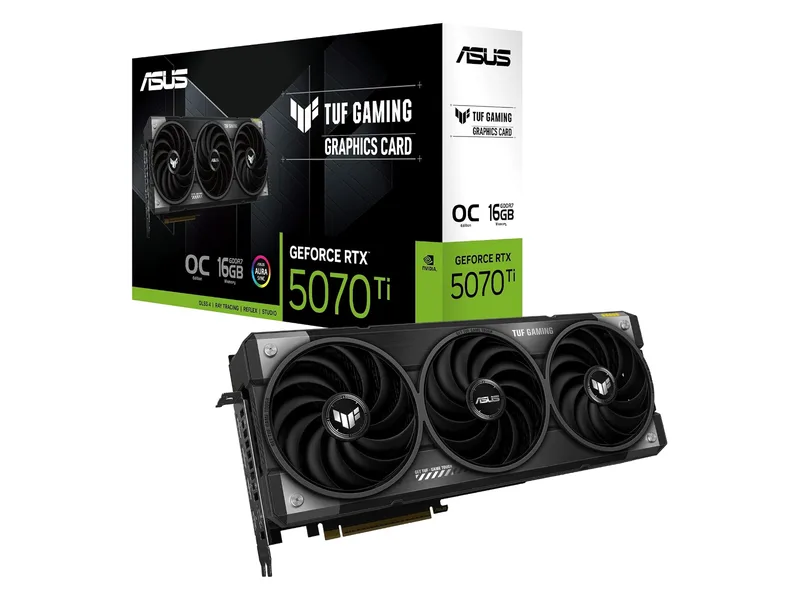
RTX 5070 Ti (ASUS TUF)
The fastest card here, with DLSS and 16GB. You pay the steepest markup for it.
RTX 5070 Ti · 16GB GDDR7 · 256-bit · 3.125-slot

850W for TUF RTX 5070 Ti. 750W for Prime RX 9070 XT. 550W for Prime RX 9060 XT. Check your CPU power cap and cables next.
5GPU examples · PSU sizing tiers
We may earn a commission when you buy through our links. As an Amazon Associate I earn from qualifying purchases. Affiliate disclosure
Quick List · Above the Fold
RTX 5070 Ti · 16GB GDDR7 · 256-bit · 3.125-slot
RTX 5070 Ti · 16GB GDDR7 · 256-bit · 2.5-slot
RX 9070 XT · 16GB GDDR6 · 256-bit · 2.5-slot
RTX 5070 · 12GB GDDR7 · 192-bit · 2.5-slot
RX 9060 XT · 16GB GDDR6 · 128-bit · 2.5-slot
| GPU power class | PSU starting tier: 65W / 105W CPU cap | PSU starting tier: 230W / 253W CPU cap | Connector plan | Excursion standard | Next step |
|---|---|---|---|---|---|
| 575W flagship RTX 5090 | 1000W / 1200W | 1200W / 1200W | Direct 600W 12V-2x6 preferred; exact board instructions apply | ATX 3.1 total PSU: 200%; eligible GPU: 300%, at 100 µs | Tier A · calculator |
| 360W upper-high RTX 5080 | 850W / 850W | 1000W / 1000W | Direct 12V-2x6; 600W-rated cable offers capacity above NVIDIA’s 450W cable option | Same qualified 200% / 300% case | Tier A · calculator |
| 300W RTX 5070 Ti | 750W / 750W; TUF: 850W / 850W | 850W / 850W | Direct 12V-2x6 preferred | Same qualified 200% / 300% case | TUF · GIGABYTE SFF · calculator |
| 304W RX 9070 XT | 750W / 750W | 850W / 850W | ASUS Prime: 3× dedicated 8-pin PCIe | Legacy 8-pin has no equivalent 300% excursion allowance | Prime RX 9070 XT · calculator |
| 250W RTX 5070 / 220W RX 9070 | Reference: 650W / 650W; Prime RTX: 750W / 750W | 750W / 850W for 250W; 750W / 750W for 220W | RTX: 16-pin; RX: exact-board 8-pin count | 200% / 300% case for eligible 16-pin; no legacy 8-pin equivalent | Prime RTX 5070 · GPU comparison · calculator |
| RX 9060 XT 16GB: 160W AMD reference | 550W / 550W | 650W / 750W | ASUS Prime: 1× 8-pin PCIe | Legacy 8-pin has no equivalent 300% excursion allowance | Prime RX 9060 XT · calculator |
Choose by the exact board first. These are capacity planning tiers, not PSU quality grades or certified minimums for every build. The five GPU examples below identify cabling needs; they are graphics cards, not PSU models. There is no shortlisted RTX 5090 or RTX 5080 retail board here.
Use the interactive GPU + PSU ATX 3.1 wattage and case clearance calculator as an estimate, then apply the board maker’s recommendation. For the upgrade itself, read which graphics card to buy or the old gaming PC upgrade checklist.
The CPU columns are assumed peak package caps, not CPU TDP labels. Our planning rule is (GPU reference watts + CPU cap + 95W for the rest of the PC) × 1.30, rounded up to 550W, 650W, 750W, 850W, 1000W or 1200W, then raised to the relevant manufacturer PSU floor. The 95W allowance and 30% margin are editorial assumptions; replace them for extra drives, pumps or other loads.
For example, a 300W GPU plus a 253W CPU cap and 95W allowance totals 648W; the planning target is 842.4W, rounded to 850W. This margin is separate from a PSU’s transient qualification. CPU boost settings can exceed a 65W or 105W TDP, so check the configured package limit.
NVIDIA lists 300W and 250W GPU power for the RTX 5070 Ti and RTX 5070, with 750W and 650W system recommendations. ASUS specifies 850W for its TUF RTX 5070 Ti and 750W for its Prime RTX 5070. AMD’s reference RX 9060 XT 16GB is 160W; a blanket 180W or 182W rating would misidentify that reference. Partner OC limits may differ.
The Hardware Pick uses manufacturer specifications and installation guidance here. These tiers do not rank ripple, noise, protection behavior or durability of individual PSU models. Before buying a particular PSU, confirm its exact revision, ATX compliance, usable 12V output, cable inventory, dimensions, warranty and independent electrical evaluation.
ATX 3.0 introduced explicit transient-load provisions. ATX 3.1 updates the connector to 12V-2x6 and revises timing requirements; it does not make an existing, compatible ATX 3.0 PSU obsolete. Seasonic’s comparison also distinguishes the 12 ms required hold-up target from the 17 ms recommended target in ATX 3.1. The version badge alone cannot establish better electrical performance.
Intel’s design guide, Table 3-3, specifies 200% PSU output for 100 µs at a 5% test duty cycle for supplies above 450W with 12V-2x6. Its other column uses 150%. Table 3-1 permits eligible total-card excursions up to 300% for intervals up to 100 µs. These are different limits; neither is continuous output. Legacy 6-pin/8-pin auxiliary connections do not receive the same excursion allowance.
An older pre-ATX-3.0 750W supply may trip over-current protection (OCP) or suffer voltage droop during a brief load excursion. That is a possible mechanism, not evidence that every old 750W PSU fails with Blackwell or RDNA 4. Investigate the exact PSU, cabling and system before attributing shutdowns to transients.
PCI-SIG’s ECN notice identifies 12V-2x6 as the CEM 5.1 replacement for 12VHPWR. PCIe 5.1 in this PSU context refers to the connector specification, not a requirement for a PCIe 5.1 motherboard slot.
CORSAIR’s connector explanation describes power contacts 0.25 mm longer and sense contacts shortened by 1.5 mm relative to 12VHPWR. These are changes in the header/socket, not a reason to assume every older cable must be discarded.
Intel’s Table 3-6 uses SENSE0/SENSE1 to signal 150W, 300W, 450W or 600W sustained limits; both open means zero cable power. Recessed sense contacts help with engagement sequencing. A compliant card should not draw its 300W–600W cable allowance without the proper sense state. This is not a guarantee against overheating or a substitute for checking that the plug is flush and latched.
Power down and disconnect AC before working on cables. Use the PSU manufacturer’s cable compatibility list. Modular PSU sockets are not standardized across brands or every model in one brand; never swap a cable simply because it fits.
CableMod recommends at least 35 mm before bending its 12V-2x6 cable. Follow a larger clearance if your cable or GPU maker specifies one; NVIDIA’s RTX 5080 installation guidance calls for 36 mm additional cable space. Close the side panel only when it applies no pressure to the connector.
Measure GPU length toward the front fans separately from connector-to-side-panel clearance. Adding 35 mm to card length does not prove that a top-facing connector clears the glass. Also check card height, slot thickness, riser position and the PSU’s cable exit space.
The ASUS Prime RX 9070 XT has three 8-pin sockets. Plan three separate PCIe cable runs from the PSU. A single daisy-chained harness is not our recommendation for this board. Two dedicated runs plus a pigtail should only be considered with explicit approval for that exact PSU/cable/card combination; a 16AWG wire marking alone does not establish connector or harness capacity. PCIe 8-pin sockets do not imply a multi-rail PSU architecture.
Reasons to Buy: You are planning a 575W RTX 5090 system, a high CPU power cap, or a 360W RTX 5080 build with substantial additional loads. NVIDIA’s RTX 5090 system floor is 1000W; the planning rule can move it to 1200W. Choose a compatible direct 600W GPU cable for the flagship class.
Reasons to Skip: Your complete build fits a lower tier and no planned upgrade needs the extra capacity. More watts cannot compensate for poor electrical design. No PSU model or flagship retail board is recommended in this shortlist.
Reasons to Buy: The ASUS TUF RTX 5070 Ti calls for 850W, or your 300W–304W GPU and high CPU package cap put the estimate above 750W. A compatible direct 12V-2x6 cable reduces adapter bulk for the TUF.
Reasons to Skip: Your lower-power board and system already meet their requirements on a suitable existing supply. Conversely, do not force a flagship build into this tier when its maker or your load budget requires more.
Reasons to Buy: You are using the GIGABYTE RTX 5070 Ti WINDFORCE SFF or ASUS Prime RX 9070 XT, both with 750W board-maker recommendations. Choose the correct 16-pin or three-8-pin cable plan; the wattage alone does not settle that choice.
Reasons to Skip: A high CPU cap and peripherals exceed your budget, or the case cannot accommodate the PSU and cables. GIGABYTE lists this SFF board at 304 × 126 × 50 mm; SFF branding does not mean 261 mm or guarantee a Mini-ITX fit.
Reasons to Buy: Your exact GPU board permits 650W and the complete system fits. NVIDIA’s RTX 5070 reference recommendation is 650W, but the ASUS Prime RTX 5070 OC in this shortlist specifies 750W. Follow the latter for that board.
Reasons to Skip: You own that ASUS Prime board, a higher-power OC variant, or a high CPU cap that calls for 750W or more. Do not downsize based only on the GPU family name. Compare features in RTX 5070 vs RX 9070.
Reasons to Buy: The ASUS Prime RX 9060 XT 16GB specifies 550W and one 8-pin connector. With a modest CPU cap, a suitable existing PSU can avoid an unnecessary replacement; a native 16-pin cable is not needed for this card.
Reasons to Skip: The PSU is unhealthy, lacks a compatible PCIe cable, or your CPU and other loads exceed the budget. At a 253W CPU cap, even our 160W reference-GPU example rounds to 750W. A future 300W GPU also warrants a fresh calculation.
Yes, when its capacity and manufacturer-approved cabling meet the card’s requirements. CORSAIR states that compatible existing 12VHPWR cables and adapters work with the revised header. Check the exact PSU’s compatibility list and cable power rating; ATX 3.1 is a sensible starting point for a new high-power build, not an automatic replacement order.
Use only the board-supplied or explicitly approved adapter, connect every required input with the prescribed PSU cables, and seat the 16-pin end fully. A direct, PSU-approved cable simplifies routing; it does not guarantee safe seating. Adapter input counts differ: ASUS lists a one-to-three adapter for the TUF RTX 5070 Ti, while GIGABYTE lists a two-8-pin adapter for this WINDFORCE SFF. Follow the actual board’s instructions.
Start with the exact board: TUF RTX 5070 Ti, 850W; GIGABYTE WINDFORCE SFF RTX 5070 Ti, 750W; ASUS Prime RX 9070 XT, 750W. Then account for CPU package limits and extra loads. Our 30% planning margin moves the 300W–304W class to 850W with a 230W–253W CPU cap.
SFX describes the PSU form factor, not the GPU length or connector clearance. Confirm the case’s supported PSU type and maximum depth, including SFX-L versus SFX where relevant. Measure cable exits, mounting bracket, GPU height and side-panel space. A shorter PSU cannot fix a panel pressing on the GPU plug.
No. It uses broad GPU/CPU presets, a 95W allowance, a 30% margin and a minimum displayed tier of 750W. Its approximate board lengths and length-plus-cable fit check do not model separate front and side-panel dimensions. Its RX 9060 XT preset uses a conservative 180W allowance rather than AMD’s 160W reference; CPU presets also need checking against your configured limits. Use the exact-board table above for manufacturer floors and verify physical fit separately before ordering.
Estimate power using GPU/CPU classes, a 95W allowance for other parts and an illustrative 30% margin. Reference dimensions do not verify your exact card, cable space or complete PC. Check the sourced rig rules before ordering.
Estimated Combined System Peak: 617W (360W GPU + 162W CPU + 95W Board/NVMe/Fans) · 30% Headroom Target: 850W
Connector Requirement: Check the exact PSU cable and GPU installation instructions. Cable bend space is a separate check and remains UNKNOWN here.
Case Clearance Check: ESTIMATE (+45mm length margin): 355mm usable case length minus ~310mm reference length. Width, slots and cable clearance are UNKNOWN.
Confirm your email to receive the weekly hardware briefing and the printable 2026 PC Upgrade & GPU/PSU Checklist PDF.
The fastest card here, with DLSS and 16GB. You pay the steepest markup for it.
RTX 5070 Ti · 16GB GDDR7 · 256-bit · 3.125-slot
An RTX 5070 Ti option with 16GB GDDR7 and a 304 mm triple-fan cooler. Check your power supply and case clearance.
RTX 5070 Ti · 16GB GDDR7 · 256-bit · 2.5-slot
16GB, near-RTX 5070 Ti raster speed, and a smaller premium over MSRP.
RX 9070 XT · 16GB GDDR6 · 256-bit · 2.5-slot
DLSS at 1440p for less. 12GB is the compromise you sign up for.
RTX 5070 · 12GB GDDR7 · 192-bit · 2.5-slot
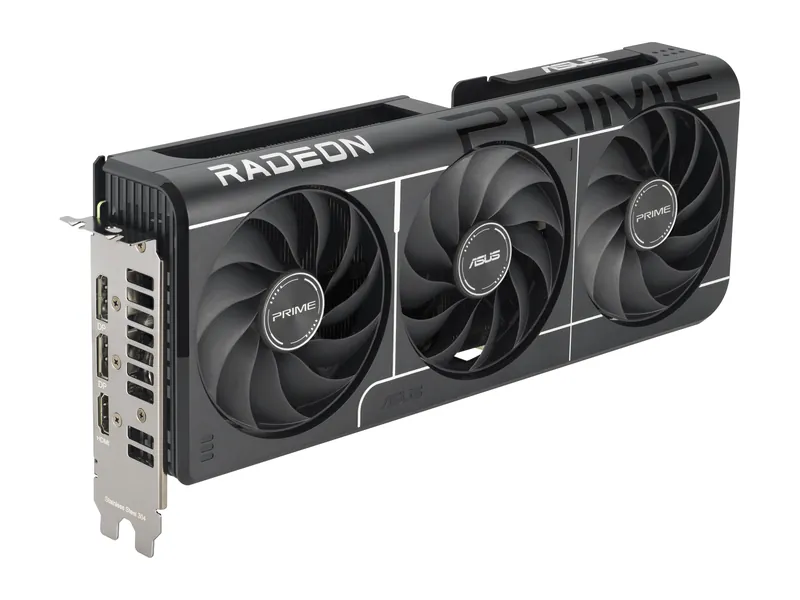
Our lowest-MSRP route to 16GB. Built for 1080p, fine at 1440p with sensible settings.
RX 9060 XT · 16GB GDDR6 · 128-bit · 2.5-slot
ASUS TUF Gaming GeForce RTX 5070 Ti 16GB GDDR7 OC Edition · 1 of 5
RTX 5070 Ti · 16GB GDDR7 · 256-bit · 3.125-slot
Get it if You need the 850W PSU ASUS recommends for this board, with a compatible direct 16-pin cable and room for the 329 mm cooler.
Skip it if Your case cannot fit its 329 × 140 × 62.5 mm body plus the cable, or your planned CPU and other loads require more capacity.
The fastest card here, with DLSS and 16GB. You pay the steepest markup for it.
RTX 5070 Ti · 16GB GDDR7 · 256-bit · 3.125-slot
| GPU | NVIDIA GeForce RTX 5070 Ti · 8,960 CUDA cores (NVIDIA) |
|---|---|
| VRAM | 16GB GDDR7 · 256-bit (NVIDIA) |
| Memory bandwidth | 896 GB/s (28 Gbps × 256-bit, ASUS/NVIDIA) |
| 1440p raster | 116.8 fps avg for the RTX 5070 Ti chip, 1440p ultra (Tom's Hardware hierarchy) |
| 1440p ray tracing | 66.2 fps avg for the RTX 5070 Ti chip, 1440p ultra (Tom's Hardware hierarchy) |
| Boost clock | 2610 MHz in OC mode (ASUS) |
| Board power | 300W total graphics power (NVIDIA) |
| Power connectors | 1× 16-pin (ASUS) |
| Recommended PSU | 850W (ASUS) |
| Size | 329 × 140 × 62.5 mm · 3.125 slots (ASUS) |
| Outputs | 2× HDMI 2.1b · 3× DisplayPort 2.1b (ASUS) |
| Launch MSRP (GPU) | See the linked launch source. |
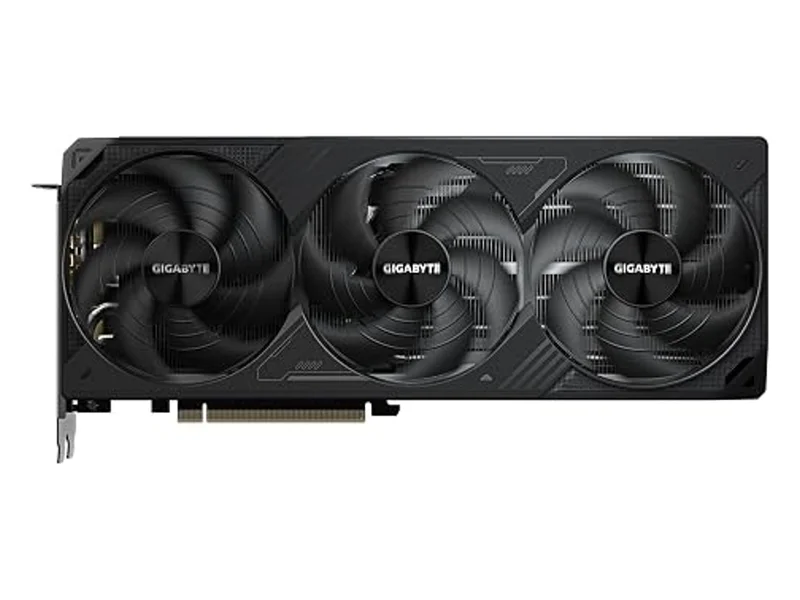
GIGABYTE GeForce RTX 5070 Ti WINDFORCE SFF 16G · 2 of 5
RTX 5070 Ti · 16GB GDDR7 · 256-bit · 2.5-slot
Get it if You want this 304 mm RTX 5070 Ti and can meet GIGABYTE's 750W recommendation with enough connector and cooling space.
Skip it if You need a 261 mm card, or your case accepts neither the chosen PSU form factor nor the fully seated power cable.
An RTX 5070 Ti option with 16GB GDDR7 and a 304 mm triple-fan cooler. Check your power supply and case clearance.
RTX 5070 Ti · 16GB GDDR7 · 256-bit · 2.5-slot
| GPU | NVIDIA GeForce RTX 5070 Ti · 8,960 CUDA cores (NVIDIA) |
|---|---|
| VRAM | 16GB GDDR7 · 256-bit (NVIDIA) |
| Memory bandwidth | 896 GB/s (28 Gbps × 256-bit, GIGABYTE/NVIDIA) |
| 1440p raster | 116.8 fps GPU reference (Tom's Hardware); not a measurement of this GIGABYTE board |
| 1440p ray tracing | 66.2 fps GPU reference (Tom's Hardware); not a measurement of this GIGABYTE board |
| Boost clock | 2452 MHz core clock (GIGABYTE) |
| Board power | 300W total graphics power (NVIDIA) |
| Power connectors | 1× 16-pin (GIGABYTE) |
| Recommended PSU | 750W (GIGABYTE) |
| Size | 304 × 126 × 50 mm (GIGABYTE) |
| Outputs | 1× HDMI 2.1b · 3× DisplayPort 2.1b (GIGABYTE) |
| Launch MSRP (GPU) | See the linked launch source. |
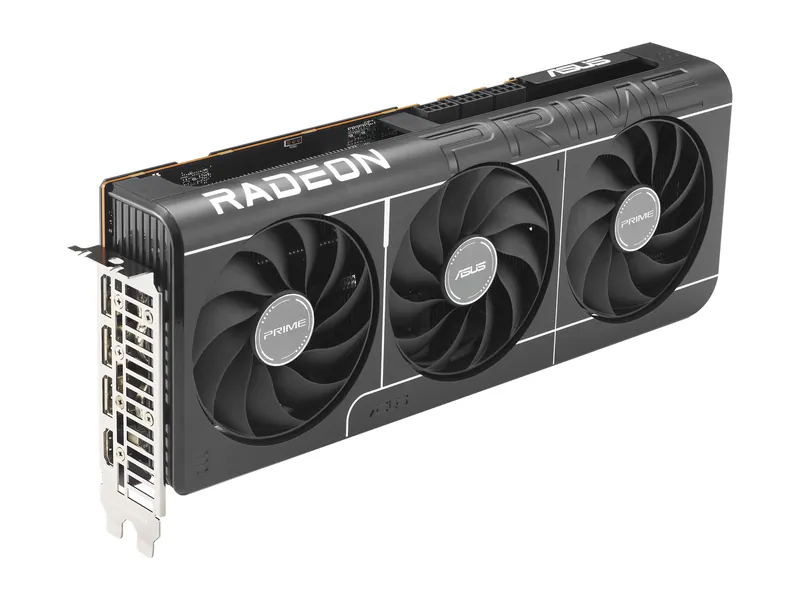
ASUS Prime Radeon RX 9070 XT OC Edition 16GB · 3 of 5
RX 9070 XT · 16GB GDDR6 · 256-bit · 2.5-slot
Get it if You can meet ASUS's 750W recommendation and provide three dedicated PCIe 8-pin cable runs for the Prime RX 9070 XT.
Skip it if Your PSU lacks the required PCIe cables, or you would need to feed all three sockets from one daisy-chained harness.
16GB, near-RTX 5070 Ti raster speed, and a smaller premium over MSRP.
RX 9070 XT · 16GB GDDR6 · 256-bit · 2.5-slot
| GPU | AMD Radeon RX 9070 XT · 64 compute units (AMD) |
|---|---|
| VRAM | 16GB GDDR6 · 256-bit · 640 GB/s (AMD) |
| Memory bandwidth | 640 GB/s (AMD) |
| 1440p raster | 116.5 fps avg, 1440p ultra (Tom's Hardware hierarchy) |
| 1440p ray tracing | 55.5 fps avg, 1440p ultra (Tom's Hardware hierarchy) |
| Boost clock | Up to 3030 MHz in OC mode (ASUS) |
| Board power | 304W total board power (AMD reference) |
| Power connectors | 3× 8-pin (ASUS) |
| Recommended PSU | 750W (ASUS) |
| Size | 312 × 130 × 50 mm · 2.5 slots (ASUS) |
| Outputs | 1× HDMI 2.1b · 3× DisplayPort 2.1a (ASUS) |
| Launch MSRP (GPU) | See the linked launch source. |
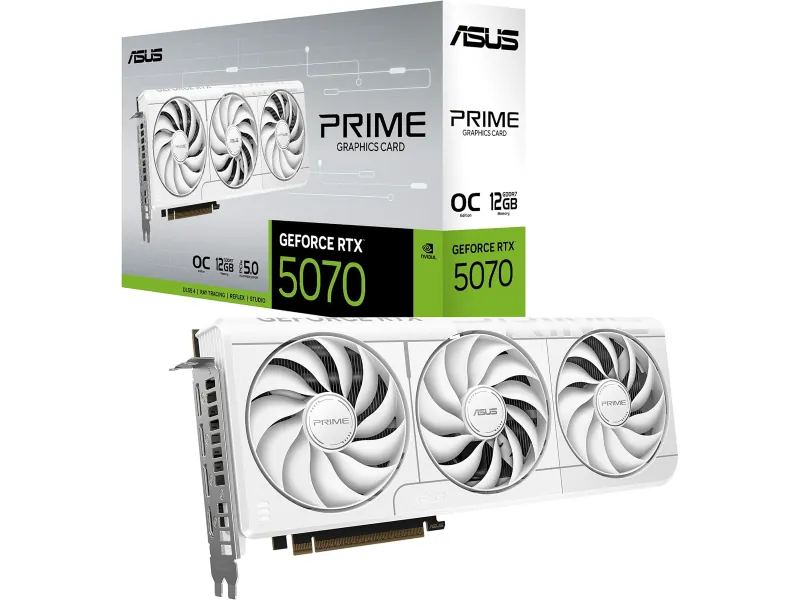
ASUS Prime GeForce RTX 5070 OC Edition 12GB · 4 of 5
RTX 5070 · 12GB GDDR7 · 192-bit · 2.5-slot
Get it if You want the Prime RTX 5070 OC and have the 750W supply ASUS recommends, with a compatible 16-pin connection.
Skip it if You are relying on NVIDIA's 650W reference recommendation to clear this exact ASUS board without checking ASUS's requirement.
DLSS at 1440p for less. 12GB is the compromise you sign up for.
RTX 5070 · 12GB GDDR7 · 192-bit · 2.5-slot
| GPU | NVIDIA GeForce RTX 5070 · 6,144 CUDA cores (NVIDIA) |
|---|---|
| VRAM | 12GB GDDR7 · 192-bit (NVIDIA) |
| Memory bandwidth | 672 GB/s (28 Gbps × 192-bit, ASUS/NVIDIA) |
| 1440p raster | 96.4 fps avg, 1440p ultra (Tom's Hardware hierarchy) |
| 1440p ray tracing | 51.5 fps avg, 1440p ultra (Tom's Hardware hierarchy) |
| Boost clock | 2587 MHz in OC mode (ASUS) |
| Board power | 250W total graphics power (NVIDIA) |
| Power connectors | 1× 16-pin (ASUS) |
| Recommended PSU | 750W for this card (ASUS; NVIDIA lists 650W for the chip) |
| Size | 304 × 126 × 50 mm · 2.5 slots (ASUS) |
| Outputs | 1× HDMI 2.1b · 3× DisplayPort 2.1b (ASUS) |
| Launch MSRP (GPU) | See the linked launch source. |
ASUS Prime Radeon RX 9060 XT OC Edition 16GB · 5 of 5
RX 9060 XT · 16GB GDDR6 · 128-bit · 2.5-slot
Get it if You have a modest CPU power limit and a healthy 550W PSU that meets ASUS's guidance and provides one PCIe 8-pin cable.
Skip it if You plan a much higher-power GPU next, or your CPU package limit pushes the complete system into a larger PSU tier.
Our lowest-MSRP route to 16GB. Built for 1080p, fine at 1440p with sensible settings.
RX 9060 XT · 16GB GDDR6 · 128-bit · 2.5-slot
| GPU | AMD Radeon RX 9060 XT · 32 compute units (AMD) |
|---|---|
| VRAM | 16GB GDDR6 · 128-bit (AMD) |
| Memory bandwidth | 320 GB/s (AMD) |
| 1440p raster | 67.3 fps avg, 1440p ultra (Tom's Hardware hierarchy) |
| 1440p ray tracing | 31.0 fps avg, 1440p ultra (Tom's Hardware hierarchy) |
| Boost clock | Up to 3330 MHz in OC mode (ASUS) |
| Board power | 160W total board power (AMD reference) |
| Power connectors | 1× 8-pin (ASUS) |
| Recommended PSU | 550W (ASUS) |
| Size | 304 × 126 × 50 mm · 2.5 slots (ASUS) |
| Outputs | 1× HDMI 2.1b · 2× DisplayPort 2.1a (ASUS) |
| Launch MSRP (GPU) | See the linked launch source. |
Image credits: RTX 5070 Ti (ASUS TUF) — ASUS (via Amazon) · RTX 5070 Ti (GIGABYTE) — GIGABYTE (via Amazon) · RX 9070 XT (ASUS Prime) — ASUS · RTX 5070 (ASUS Prime) — ASUS (Amazon listing) · RX 9060 XT 16GB (ASUS Prime) — ASUS.