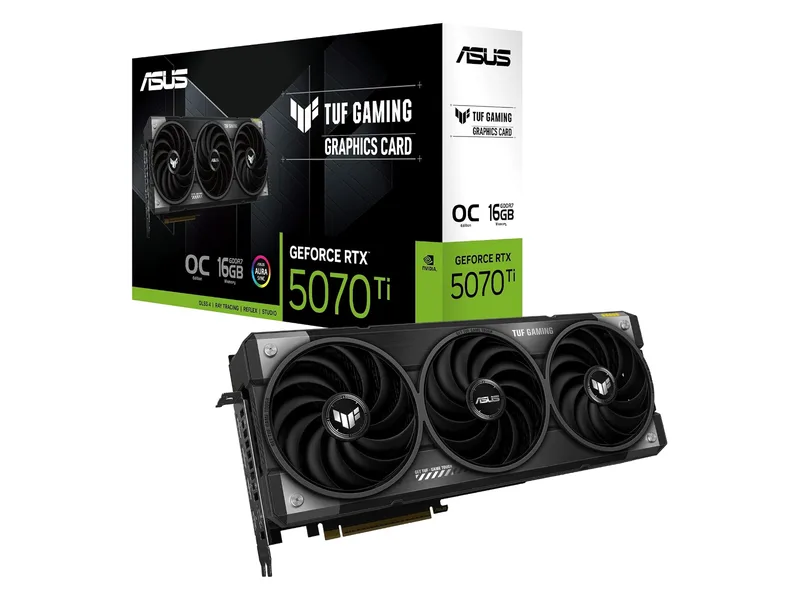
X3D gaming pairing
RTX 5070 Ti (ASUS TUF)
The fastest card here, with DLSS and 16GB. You pay the steepest markup for it.
RTX 5070 Ti · 16GB GDDR7 · 256-bit · 3.125-slot

Start with X3D for high-refresh gaming or a 9600X for mainstream builds. These links show GPU and laptop examples.
5GPU and system pairing examples
We may earn a commission when you buy through our links. As an Amazon Associate I earn from qualifying purchases. Affiliate disclosure
Quick List · Above the Fold
RTX 5070 Ti · 16GB GDDR7 · 256-bit · 3.125-slot
RX 9070 XT · 16GB GDDR6 · 256-bit · 2.5-slot
RTX 5070 · 12GB GDDR7 · 192-bit · 2.5-slot
RX 9060 XT · 16GB GDDR6 · 128-bit · 2.5-slot
Ryzen 9 8940HX · RTX 5060 · 16GB (2×8GB) · 1TB · 16" QHD+ 240Hz
| CPU architecture tier | Cores/threads & L3 cache | Package-power planning input, not measured peak | Ideal GPU tier to evaluate | Platform socket & memory standard | Pairing card |
|---|---|---|---|---|---|
| 1. Gaming-first X3D: 9800X3D / 7800X3D | Zen 5 / Zen 4; 8/16; 96MB each | 120W TDP; 162W PPT allowance | RTX 5070 Ti / RX 9070 XT; assess RTX 5080/5090 against the target game | AM5, DDR5; 6000 CL30 EXPO is an optional profile | RTX 5070 Ti · RX 9070 XT |
| 2. Gaming + creation: 9950X3D / 9950X / 285K | Zen 5: 16/32, 128MB / 64MB; Intel hybrid: 24/24, 36MB | AMD 170W TDP, 230W PPT allowance; Intel 125W base, 250W max turbo | RTX 5070 Ti / RX 9070 XT; faster GPU if the workload warrants it | AMD AM5 DDR5; Intel LGA1851 DDR5 up to 6400 subject to configuration | Desktop GPU example |
| 3. Mainstream: 9600X / 9700X / 245K | Zen 5: 6/12 or 8/16, 32MB; Intel hybrid: 14/14, 24MB | AMD 65W TDP, 88W PPT allowance; optional 105W mode, 142W allowance; Intel 125W base, 159W max turbo | RTX 5070 12GB / RX 9070 16GB / RX 9060 XT 16GB | AM5 DDR5; optional 6000 CL30 EXPO. LGA1851 DDR5 up to 6400 | RTX 5070 |
| 4. Platform keepers: 5700X3D / 7600X / existing LGA1700 | Zen 3: 8/16, 96MB; Zen 4: 6/12, 32MB; Intel varies by exact CPU | AMD 105W TDP, 142W PPT allowance; Intel: check exact SKU and board limits | RX 9060 XT 16GB; evaluate a faster card only after checking CPU limits | 5700X3D AM4 DDR4; 7600X AM5 DDR5; LGA1700 DDR4 or DDR5 board, not interchangeable | RX 9060 XT |
| Mobile HX reference: 8940HX | Zen 4; 16/32; 64MB | 55W default TDP; 55 to 75W cTDP, not a peak-package rating | Exact MSI system: RTX 5060 Laptop 8GB | Integrated laptop platform; this MSI uses DDR5-5600 | Complete MSI laptop |
These are buying tiers for the named CPUs, not a measured FPS ranking or an exhaustive list of every 2026 processor. GPU links jump to graphics-card examples; CPUs are purchased separately. Swipe the table on a small screen.
AMD’s product pages publish TDP, which is not PPT. The Ryzen PPT values above are planning allowances for the stated power classes, not a claim that AMD publishes those exact limits on each product page. Confirm the actual PPT in BIOS or Ryzen Master. PBO, Eco Mode and optional TDP modes change the assumption. Intel’s maximum turbo power is also a limit, not promised gaming consumption.
Start with which graphics card to buy, then use the GPU + CPU package power and ATX 3.1 PSU calculator. Read RTX 5070 vs RX 9070 if that is your GPU decision. A CPU name alone cannot establish the right PSU or an exact bottleneck percentage.
We compared manufacturer-listed architecture, core counts, cache, sockets and power definitions. Pairings are editorial starting points for checking your games and workload. We have not benchmarked these CPU/GPU combinations. The product photos show the linked GPUs and laptop, not the CPUs discussed here.
The 9800X3D and 7800X3D each have eight cores, sixteen threads and 96MB of L3. That is L3 alone; AMD’s combined cache figure also includes L2. The newer model uses Zen 5 rather than Zen 4.
More cache can keep frequently reused game data closer to the cores. Whether it improves a game’s 1% lows depends on that game’s workload. Shader compilation, storage access and software faults can still cause stutter. Neither chip guarantees smooth frame times in every game.
An RTX 5070 Ti or RX 9070 XT is a pairing to investigate for high-refresh 1440p. With an RTX 5080 or 5090, examine the resolution and refresh target before assigning more of the build to the CPU. At 1080p competitive settings the CPU can matter more; at demanding 4K settings the graphics workload often dominates. A 120W TDP label does not establish cooler temperature or actual package draw.
Reasons to Buy
Reasons to Skip
The 9950X3D and 9950X each offer sixteen Zen 5 cores and thirty-two threads. Their total L3 differs: 128MB versus 64MB. The Core Ultra 9 285K has eight performance cores plus sixteen efficient cores, twenty-four threads and 36MB Intel Smart Cache.
Rendering or compilation that scales across cores can justify these CPUs. A game that relies on a few busy threads may leave many cores lightly loaded. Sixteen cores do not automatically beat an eight-core X3D in gaming; total L3 across multiple chiplets also does not mean every core has equal access latency.
Plan cooling and power for the enabled limits. Our AMD allowance is 230W PPT for this 170W TDP class. Intel specifies 250W maximum turbo power for the 285K, rather than the 253W associated with some older Intel parts. Use those limits for planning, then check the motherboard configuration. The GPU still needs its own power allowance.
Reasons to Buy
Reasons to Skip
The 9600X has six cores and twelve threads; the 9700X has eight and sixteen. Both have 32MB L3 and a default 65W TDP. MSI documents an optional 105W TDP mode on supported BIOS versions. Neither 65W nor 105W is a PPT figure.
Intel lists the Core Ultra 5 245K with six performance and eight efficient cores, fourteen threads, 24MB cache and 159W maximum turbo power. It requires LGA1851 and DDR5. It does not fit an LGA1700 motherboard.
For RTX 5070 12GB, RX 9070 16GB or RX 9060 XT 16GB builds, start by checking a mainstream CPU against the games you intend to play. 1440p Ultra can shift more work to the GPU, but it cannot guarantee the absence of a CPU bottleneck. Simulation-heavy games, high refresh targets and lower internal rendering resolutions can change the result.
Reasons to Buy
Reasons to Skip
For an AM4 owner, the 5700X3D is an eight-core, sixteen-thread Zen 3 upgrade candidate with 96MB L3. Confirm the exact motherboard’s CPU support list, required BIOS and power-delivery support before buying. It keeps DDR4; it does not create an AM5 or DDR5 platform. A 7600X is a separate six-core Zen 4 AM5 option with 32MB L3 and 105W TDP, not an AM4 drop-in.
An existing LGA1700 PC also deserves a workload check before replacement. Identify the installed CPU and whether the board uses DDR4 or DDR5. Neither memory type can be substituted into an unsupported slot, and LGA1851 CPUs require a different motherboard.
PCIe generation alone is not a reason to rebuild. Check the GPU’s electrical lane width, the board’s slot wiring and whether an M.2 device shares lanes. Backward compatibility does not guarantee equal performance in every configuration. Use PCI-SIG’s compatibility guidance and your motherboard manual, then follow the old gaming PC upgrade checklist.
Reasons to Buy
Reasons to Skip
AMD lists the 8940HX with sixteen Zen 4 cores, thirty-two threads and 64MB L3. Its 55W default TDP and 55 to 75W configurable range do not establish peak package power or sustained performance inside a particular laptop.
MSI specifies an RTX 5060 Laptop GPU and DDR5-5600 for D8WFKG-090US. Do not read this as an RTX 5070 Laptop configuration. Laptop and desktop GPU names also do not establish equivalent performance. Cooling, firmware and configured GPU power matter; MSI’s table does not publish that GPU power limit.
Reasons to Buy
Reasons to Skip
DDR5-6000 CL30 is a common AM5 tuning target to evaluate, not a JEDEC guarantee for every Ryzen system. AMD EXPO enables memory overclocking; use the board’s memory support list and the CPU’s supported memory specifications. Two DIMMs and four DIMMs can have different supported speeds. For example, AMD lists DDR5-5600 for two-DIMM configurations on the 9600X; a 6000 profile goes beyond that specification.
Intel’s Series 2 brief lists DDR5-6400 support with configuration conditions. That does not mean any four-DIMM kit runs at 6400. JEDEC’s DDR5 standard defines the memory technology; it does not certify a particular EXPO profile for your CPU. Check how much RAM gaming needs before paying for speed or capacity you cannot use.
The embedded calculator below adds GPU power, a CPU planning input and a board/accessory allowance, then applies headroom. Its output is an estimate. Follow the higher of that estimate and the exact GPU manufacturer’s PSU recommendation, and check cables, connectors and physical clearance separately. Do not use the desktop selector to size a laptop power adapter.
There is no fixed percentage for a pair of product names. Compare the same game scene and settings at both resolutions. A large frame-rate increase after lowering resolution suggests the GPU had been limiting performance. Little change suggests a CPU or another limit worth investigating. For scale, 144 fps allows about 6.94ms per frame and 240 fps about 4.17ms, calculated as 1000 divided by fps. CPU and GPU work overlap, so those budgets are not times to add together. Check frame-time traces and individual busy threads; total CPU utilization can hide a limit.
TDP describes a thermal design class, not the whole system’s electrical peak. AMD PPT and Intel turbo power limits describe power constraints that can exceed the headline TDP or base power. Use the limits enabled on your board alongside the GPU and other components. Neither a limit nor a calculator estimate is a measurement of wall draw or a guarantee against every transient.
It is an optional tuning target, not a universal requirement. CL30 describes one timing at that transfer rate, not all memory latency. Prioritize sufficient capacity, motherboard compatibility and stable operation. Check EXPO support and whether the profile exceeds your CPU’s official memory specification before enabling it.
When the game benefits more from the eight-core processor’s cache, per-core performance or memory behavior than from extra threads. Additional cores help only if the workload uses them effectively. A core count and cache capacity cannot predict the winner for every game; compare the particular game, settings and software versions before buying.
Start by evaluating the Ryzen 5 9600X or Core Ultra 5 245K for a new mainstream build. Consider X3D if your games and high-refresh target justify it. Keep an existing CPU that meets your target. The RTX 5070’s 12GB VRAM, your settings and the exact card’s power requirements remain separate checks.
The fastest card here, with DLSS and 16GB. You pay the steepest markup for it.
RTX 5070 Ti · 16GB GDDR7 · 256-bit · 3.125-slot
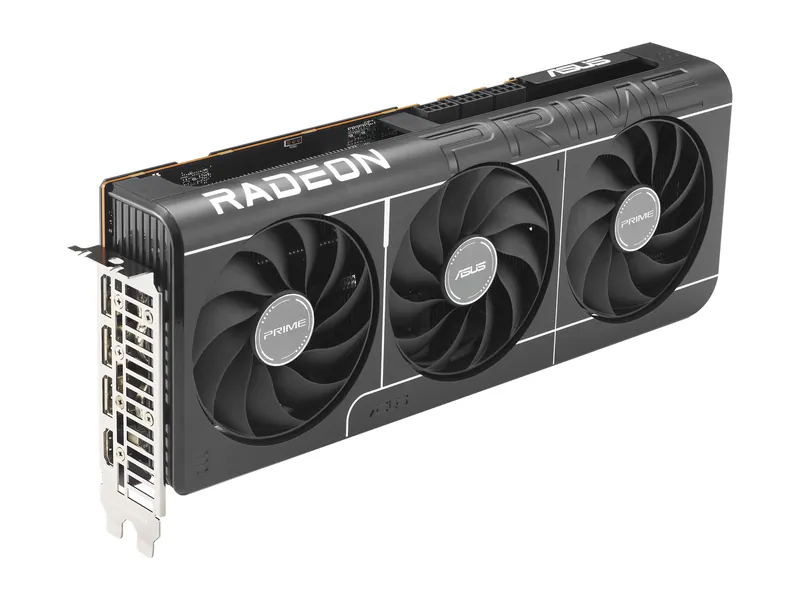
16GB, near-RTX 5070 Ti raster speed, and a smaller premium over MSRP.
RX 9070 XT · 16GB GDDR6 · 256-bit · 2.5-slot
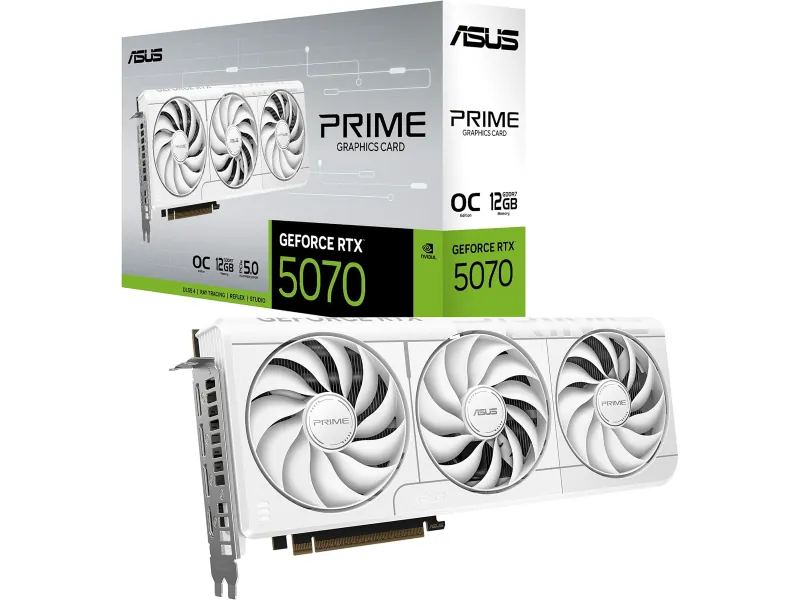
DLSS at 1440p for less. 12GB is the compromise you sign up for.
RTX 5070 · 12GB GDDR7 · 192-bit · 2.5-slot
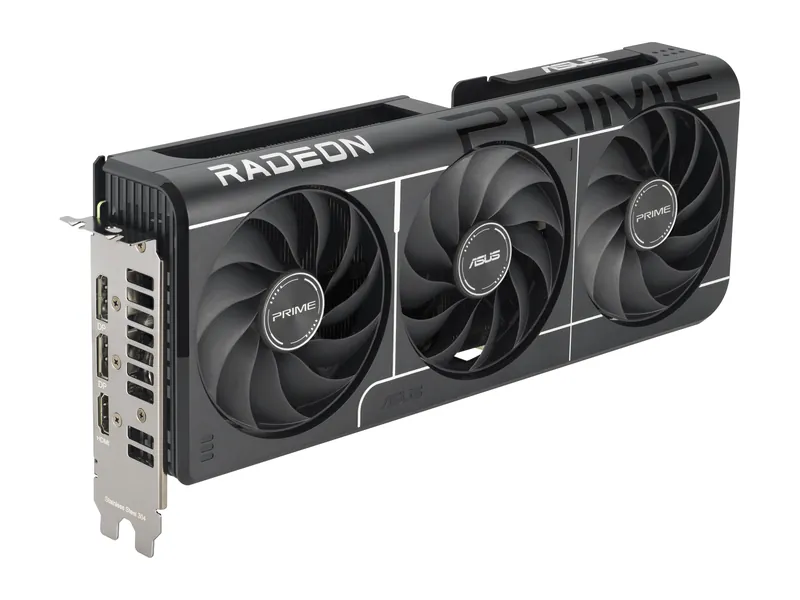
Our lowest-MSRP route to 16GB. Built for 1080p, fine at 1440p with sensible settings.
RX 9060 XT · 16GB GDDR6 · 128-bit · 2.5-slot
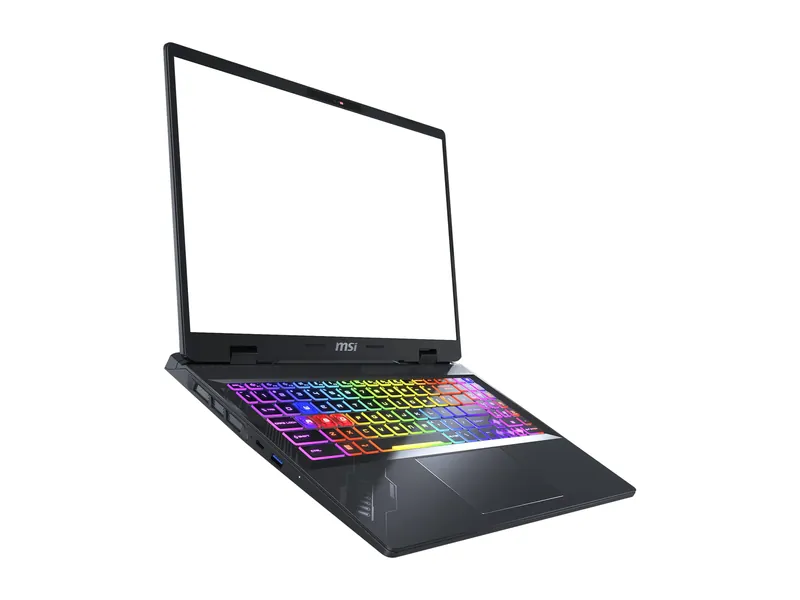
The best screen in the group: 2560×1600 at 240Hz, with dual-channel RAM.
Ryzen 9 8940HX · RTX 5060 · 16GB (2×8GB) · 1TB · 16" QHD+ 240Hz
ASUS TUF Gaming GeForce RTX 5070 Ti 16GB GDDR7 OC Edition · 1 of 5
RTX 5070 Ti · 16GB GDDR7 · 256-bit · 3.125-slot
Get it if You are building around a Ryzen 7 9800X3D or keeping a 7800X3D and want an RTX 5070 Ti class GPU. This listing is the graphics card only.
Skip it if Your present GPU already meets your target, or you need a CPU purchase link. Check this ASUS card's size and PSU requirement first.
The fastest card here, with DLSS and 16GB. You pay the steepest markup for it.
RTX 5070 Ti · 16GB GDDR7 · 256-bit · 3.125-slot
| GPU | NVIDIA GeForce RTX 5070 Ti · 8,960 CUDA cores (NVIDIA) |
|---|---|
| VRAM | 16GB GDDR7 · 256-bit (NVIDIA) |
| Memory bandwidth | 896 GB/s (28 Gbps × 256-bit, ASUS/NVIDIA) |
| 1440p raster | 116.8 fps avg for the RTX 5070 Ti chip, 1440p ultra (Tom's Hardware hierarchy) |
| 1440p ray tracing | 66.2 fps avg for the RTX 5070 Ti chip, 1440p ultra (Tom's Hardware hierarchy) |
| Boost clock | 2610 MHz in OC mode (ASUS) |
| Board power | 300W total graphics power (NVIDIA) |
| Power connectors | 1× 16-pin (ASUS) |
| Recommended PSU | 850W (ASUS) |
| Size | 329 × 140 × 62.5 mm · 3.125 slots (ASUS) |
| Outputs | 2× HDMI 2.1b · 3× DisplayPort 2.1b (ASUS) |
| Launch MSRP (GPU) | See the linked launch source. |
ASUS Prime Radeon RX 9070 XT OC Edition 16GB · 2 of 5
RX 9070 XT · 16GB GDDR6 · 256-bit · 2.5-slot
Get it if You want a 16GB Radeon pairing for AM5 X3D, a 9700X, or a Ryzen 9 used for both games and creation. This card does not include a CPU.
Skip it if You need a particular NVIDIA feature, or your case and power cables cannot accommodate this exact board.
16GB, near-RTX 5070 Ti raster speed, and a smaller premium over MSRP.
RX 9070 XT · 16GB GDDR6 · 256-bit · 2.5-slot
| GPU | AMD Radeon RX 9070 XT · 64 compute units (AMD) |
|---|---|
| VRAM | 16GB GDDR6 · 256-bit · 640 GB/s (AMD) |
| Memory bandwidth | 640 GB/s (AMD) |
| 1440p raster | 116.5 fps avg, 1440p ultra (Tom's Hardware hierarchy) |
| 1440p ray tracing | 55.5 fps avg, 1440p ultra (Tom's Hardware hierarchy) |
| Boost clock | Up to 3030 MHz in OC mode (ASUS) |
| Board power | 304W total board power (AMD reference) |
| Power connectors | 3× 8-pin (ASUS) |
| Recommended PSU | 750W (ASUS) |
| Size | 312 × 130 × 50 mm · 2.5 slots (ASUS) |
| Outputs | 1× HDMI 2.1b · 3× DisplayPort 2.1a (ASUS) |
| Launch MSRP (GPU) | See the linked launch source. |
ASUS Prime GeForce RTX 5070 OC Edition 12GB · 3 of 5
RTX 5070 · 12GB GDDR7 · 192-bit · 2.5-slot
Get it if You are planning a Ryzen 5 9600X or Core Ultra 5 245K build and have checked performance in your games at your chosen settings.
Skip it if Your workload needs more than 12GB of GPU memory, or a CPU upgrade would take resources away from the GPU you actually need.
DLSS at 1440p for less. 12GB is the compromise you sign up for.
RTX 5070 · 12GB GDDR7 · 192-bit · 2.5-slot
| GPU | NVIDIA GeForce RTX 5070 · 6,144 CUDA cores (NVIDIA) |
|---|---|
| VRAM | 12GB GDDR7 · 192-bit (NVIDIA) |
| Memory bandwidth | 672 GB/s (28 Gbps × 192-bit, ASUS/NVIDIA) |
| 1440p raster | 96.4 fps avg, 1440p ultra (Tom's Hardware hierarchy) |
| 1440p ray tracing | 51.5 fps avg, 1440p ultra (Tom's Hardware hierarchy) |
| Boost clock | 2587 MHz in OC mode (ASUS) |
| Board power | 250W total graphics power (NVIDIA) |
| Power connectors | 1× 16-pin (ASUS) |
| Recommended PSU | 750W for this card (ASUS; NVIDIA lists 650W for the chip) |
| Size | 304 × 126 × 50 mm · 2.5 slots (ASUS) |
| Outputs | 1× HDMI 2.1b · 3× DisplayPort 2.1b (ASUS) |
| Launch MSRP (GPU) | See the linked launch source. |
ASUS Prime Radeon RX 9060 XT OC Edition 16GB · 4 of 5
RX 9060 XT · 16GB GDDR6 · 128-bit · 2.5-slot
Get it if You want a 16GB GPU alongside a compatible AM4 5700X3D or AM5 7600X, after checking BIOS, case and power requirements.
Skip it if You expect a new GPU to fix CPU-limited frame times, or the exact 16GB card does not fit your system.
Our lowest-MSRP route to 16GB. Built for 1080p, fine at 1440p with sensible settings.
RX 9060 XT · 16GB GDDR6 · 128-bit · 2.5-slot
| GPU | AMD Radeon RX 9060 XT · 32 compute units (AMD) |
|---|---|
| VRAM | 16GB GDDR6 · 128-bit (AMD) |
| Memory bandwidth | 320 GB/s (AMD) |
| 1440p raster | 67.3 fps avg, 1440p ultra (Tom's Hardware hierarchy) |
| 1440p ray tracing | 31.0 fps avg, 1440p ultra (Tom's Hardware hierarchy) |
| Boost clock | Up to 3330 MHz in OC mode (ASUS) |
| Board power | 160W total board power (AMD reference) |
| Power connectors | 1× 8-pin (ASUS) |
| Recommended PSU | 550W (ASUS) |
| Size | 304 × 126 × 50 mm · 2.5 slots (ASUS) |
| Outputs | 1× HDMI 2.1b · 2× DisplayPort 2.1a (ASUS) |
| Launch MSRP (GPU) | See the linked launch source. |
MSI Crosshair A16 HX (D8WFKG-090US) · 5 of 5
Ryzen 9 8940HX · RTX 5060 · 16GB (2×8GB) · 1TB · 16" QHD+ 240Hz
Get it if You need a portable system with Ryzen 9 8940HX and the manufacturer-listed RTX 5060 Laptop GPU. This is a complete laptop, not an upgrade part.
Skip it if You want desktop GPU performance or a socketed desktop CPU upgrade. The RTX 5070 Laptop is not the GPU in this exact configuration.
The best screen in the group: 2560×1600 at 240Hz, with dual-channel RAM.
Ryzen 9 8940HX · RTX 5060 · 16GB (2×8GB) · 1TB · 16" QHD+ 240Hz
| Exact model | Crosshair A16 HX D8WFKG-090US |
|---|---|
| CPU | AMD Ryzen 9 8940HX, 2.4–5.3 GHz (MSI) |
| GPU | RTX 5060 8GB GDDR7 (MSI) |
| GPU power | Not listed by MSI |
| Memory | 16GB DDR5-5600 as 2×8GB (MSI) |
| Storage | 1TB NVMe SSD (Amazon listing) |
| Display | 16" 2560×1600, 240Hz, 100% DCI-P3 (MSI) |
| Battery | 90Wh, 4-cell (MSI) |
| Weight | 5.51 lb (MSI) |
| Webcam | 720p with shutter (MSI) |
Image credits: RTX 5070 Ti (ASUS TUF) — ASUS (via Amazon) · RX 9070 XT (ASUS Prime) — ASUS · RTX 5070 (ASUS Prime) — ASUS (Amazon listing) · RX 9060 XT 16GB (ASUS Prime) — ASUS · MSI Crosshair A16 HX — MSI.
Estimate power using GPU/CPU classes, a 95W allowance for other parts and an illustrative 30% margin. Reference dimensions do not verify your exact card, cable space or complete PC. Check the sourced rig rules before ordering.
Estimated Combined System Peak: 617W (360W GPU + 162W CPU + 95W Board/NVMe/Fans) · 30% Headroom Target: 850W
Connector Requirement: Check the exact PSU cable and GPU installation instructions. Cable bend space is a separate check and remains UNKNOWN here.
Case Clearance Check: ESTIMATE (+45mm length margin): 355mm usable case length minus ~310mm reference length. Width, slots and cable clearance are UNKNOWN.
Confirm your email to receive the weekly hardware briefing and the printable 2026 PC Upgrade & GPU/PSU Checklist PDF.