Buying guide · Graphics cards

RTX 5070 Ti vs RX 9070 XT: which fits?

Choose RTX 5070 Ti for supported DLSS Multi Frame Generation and demanding ray-traced games. Choose RX 9070 XT when raster gaming and a three-8-pin power connection suit your build. Both have 16GB; check the exact board and current retailer terms.

By The Hardware Pick editorsPublished Updated Research-based · not lab-tested

Two options · compare by fit

We may earn a commission when you buy through our links. As an Amazon Associate I earn from qualifying purchases. Affiliate disclosure

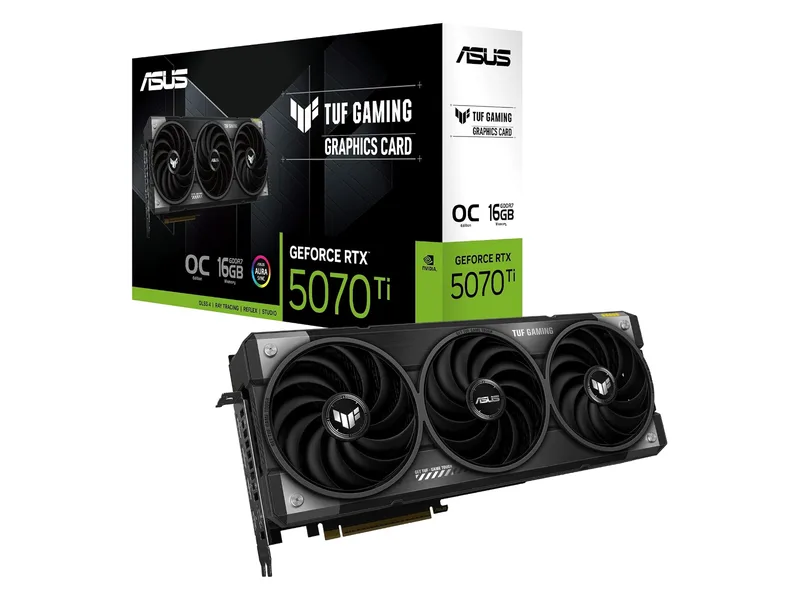
ASUS TUF Gaming GeForce RTX 5070 Ti OC Edition graphics card with triple-fan cooler
Image: ASUS (via Amazon)
For supported NVIDIA features and ray tracing

RTX 5070 Ti (ASUS TUF)

The fastest card here, with DLSS and 16GB. You pay the steepest markup for it.

RTX 5070 Ti · 16GB GDDR7 · 256-bit · 3.125-slot

Get it if You want DLSS Multi Frame Generation in supported games and can fit the 329 mm, 3.125-slot ASUS TUF board with its 16-pin connection and ASUS 850W PSU recommendation.

Skip it if Your games do not use the NVIDIA features you want, or the board and power cable will not fit your case.

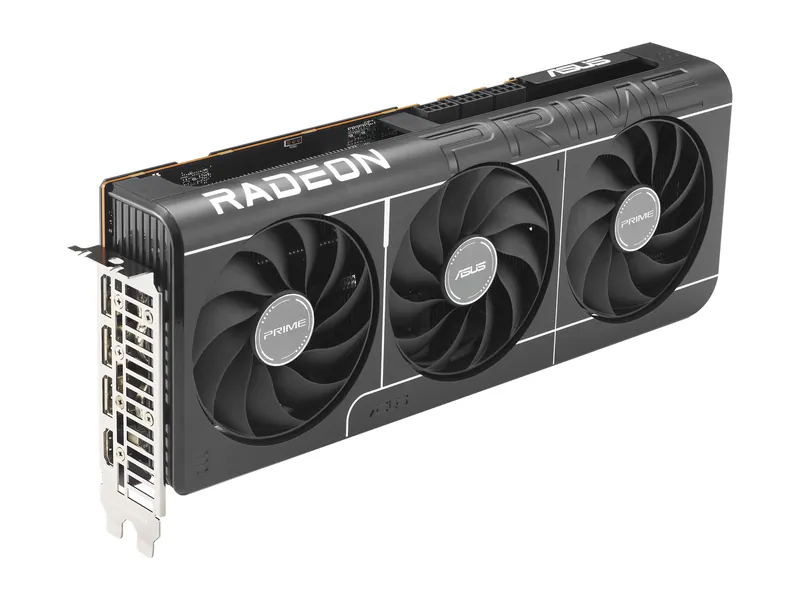
ASUS Prime Radeon RX 9070 XT OC Edition graphics card, angled view of the triple-fan cooler
Image: ASUS
For raster gaming and traditional PCIe power

RX 9070 XT (ASUS Prime)

16GB, near-RTX 5070 Ti raster speed, and a smaller premium over MSRP.

RX 9070 XT · 16GB GDDR6 · 256-bit · 2.5-slot

Get it if You want 16GB for raster gaming, have confirmed Radeon support, and can fit a 312 mm, 2.5-slot board with three 8-pin connections and ASUS 750W PSU guidance.

Skip it if You require a supported NVIDIA feature or your PSU lacks the connections specified for this exact board.

For supported NVIDIA features and ray tracing⚡ Check ATX 3.1 PSU & Case Fit →

ASUS TUF Gaming GeForce RTX 5070 Ti 16GB GDDR7 OC Edition

ASUS TUF Gaming GeForce RTX 5070 Ti 16GB GDDR7 OC Edition · 1 of 2

RTX 5070 Ti · 16GB GDDR7 · 256-bit · 3.125-slot

16GBGDDR7 VRAM
116.81440p ultra fps (Tom's)
300WBoard power (NVIDIA)
850WPSU (ASUS)

Get it if You want DLSS Multi Frame Generation in supported games and can fit the 329 mm, 3.125-slot ASUS TUF board with its 16-pin connection and ASUS 850W PSU recommendation.

Skip it if Your games do not use the NVIDIA features you want, or the board and power cable will not fit your case.

Reasons to buy

  • Best ray tracing in this group (66.2 fps at 1440p ultra, Tom's)
  • DLSS 4 with Multi Frame Generation
  • 16GB of fast GDDR7

Reasons to skip

  • Biggest markup here: Tom's median street price ran about 47% over MSRP (Oct 2026)
  • Raster speed is a tie with the cheaper RX 9070 XT
  • No NVIDIA Founders Edition at MSRP
  • Large 3.125-slot cooler; check case clearance
Full technical specifications & caveats (12 specs)

Reasons to buy

  • Best ray tracing in this group (66.2 fps at 1440p ultra, Tom's)
  • DLSS 4 with Multi Frame Generation
  • 16GB of fast GDDR7

Reasons to skip

  • Biggest markup here: Tom's median street price ran about 47% over MSRP (Oct 2026)
  • Raster speed is a tie with the cheaper RX 9070 XT
  • No NVIDIA Founders Edition at MSRP
  • Large 3.125-slot cooler; check case clearance
ASUS TUF Gaming GeForce RTX 5070 Ti 16GB GDDR7 OC Edition specifications
GPUNVIDIA GeForce RTX 5070 Ti · 8,960 CUDA cores (NVIDIA)
VRAM16GB GDDR7 · 256-bit (NVIDIA)
Memory bandwidth896 GB/s (28 Gbps × 256-bit, ASUS/NVIDIA)
1440p raster116.8 fps avg for the RTX 5070 Ti chip, 1440p ultra (Tom's Hardware hierarchy)
1440p ray tracing66.2 fps avg for the RTX 5070 Ti chip, 1440p ultra (Tom's Hardware hierarchy)
Boost clock2610 MHz in OC mode (ASUS)
Board power300W total graphics power (NVIDIA)
Power connectors1× 16-pin (ASUS)
Recommended PSU850W (ASUS)
Size329 × 140 × 62.5 mm · 3.125 slots (ASUS)
Outputs2× HDMI 2.1b · 3× DisplayPort 2.1b (ASUS)
Launch MSRP (GPU)See the linked launch source.
For raster gaming and traditional PCIe power⚡ Check ATX 3.1 PSU & Case Fit →

ASUS Prime Radeon RX 9070 XT OC Edition 16GB

ASUS Prime Radeon RX 9070 XT OC Edition 16GB · 2 of 2

RX 9070 XT · 16GB GDDR6 · 256-bit · 2.5-slot

16GBGDDR6 VRAM
116.51440p ultra fps (Tom's)
304WBoard power (AMD)
750WPSU (ASUS)

Get it if You want 16GB for raster gaming, have confirmed Radeon support, and can fit a 312 mm, 2.5-slot board with three 8-pin connections and ASUS 750W PSU guidance.

Skip it if You require a supported NVIDIA feature or your PSU lacks the connections specified for this exact board.

Reasons to buy

  • Matches the RTX 5070 Ti in Tom's 1440p raster average
  • 16GB of VRAM for long-term 1440p
  • Smaller street-price markup than the 5070 Ti (Tom's, Oct 2026)

Reasons to skip

  • Ray tracing trails the RTX 5070 Ti (55.5 vs 66.2 fps at 1440p, Tom's)
  • Needs three 8-pin cables and a 750W PSU
  • No DLSS; FSR support varies by game
Full technical specifications & caveats (12 specs)

Reasons to buy

  • Matches the RTX 5070 Ti in Tom's 1440p raster average
  • 16GB of VRAM for long-term 1440p
  • Smaller street-price markup than the 5070 Ti (Tom's, Oct 2026)

Reasons to skip

  • Ray tracing trails the RTX 5070 Ti (55.5 vs 66.2 fps at 1440p, Tom's)
  • Needs three 8-pin cables and a 750W PSU
  • No DLSS; FSR support varies by game
ASUS Prime Radeon RX 9070 XT OC Edition 16GB specifications
GPUAMD Radeon RX 9070 XT · 64 compute units (AMD)
VRAM16GB GDDR6 · 256-bit · 640 GB/s (AMD)
Memory bandwidth640 GB/s (AMD)
1440p raster116.5 fps avg, 1440p ultra (Tom's Hardware hierarchy)
1440p ray tracing55.5 fps avg, 1440p ultra (Tom's Hardware hierarchy)
Boost clockUp to 3030 MHz in OC mode (ASUS)
Board power304W total board power (AMD reference)
Power connectors3× 8-pin (ASUS)
Recommended PSU750W (ASUS)
Size312 × 130 × 50 mm · 2.5 slots (ASUS)
Outputs1× HDMI 2.1b · 3× DisplayPort 2.1a (ASUS)
Launch MSRP (GPU)See the linked launch source.

Side by side.

Pick two to compare.

Side-by-side specs of our picks
Specification
ASUS TUF Gaming GeForce RTX 5070 Ti OC Edition graphics card with triple-fan cooler
Image: ASUS (via Amazon)
For supported NVIDIA features and ray tracingRTX 5070 Ti (ASUS TUF)
ASUS Prime Radeon RX 9070 XT OC Edition graphics card, angled view of the triple-fan cooler
Image: ASUS
For raster gaming and traditional PCIe powerRX 9070 XT (ASUS Prime)
At a glance
GPUNVIDIA GeForce RTX 5070 Ti · 8,960 CUDA cores (NVIDIA)AMD Radeon RX 9070 XT · 64 compute units (AMD)
Memory capacity and type16GB GDDR7 · 256-bit (NVIDIA)16GB GDDR6 · 256-bit · 640 GB/s (AMD)
Memory bandwidth896 GB/s (28 Gbps × 256-bit, ASUS/NVIDIA)640 GB/s (AMD)
1440p raster reference116.8 fps avg for the RTX 5070 Ti chip, 1440p ultra (Tom's Hardware hierarchy)116.5 fps avg, 1440p ultra (Tom's Hardware hierarchy)
1440p ray-tracing reference66.2 fps avg for the RTX 5070 Ti chip, 1440p ultra (Tom's Hardware hierarchy)55.5 fps avg, 1440p ultra (Tom's Hardware hierarchy)
Boost clock (not comparable across architectures)2610 MHz in OC mode (ASUS)Up to 3030 MHz in OC mode (ASUS)
Vendor reference power (different definitions)300W total graphics power (NVIDIA)304W total board power (AMD reference)
Exact board power connectors1× 16-pin (ASUS)3× 8-pin (ASUS)
Exact board recommended PSU850W (ASUS)750W (ASUS)
Board dimensions329 × 140 × 62.5 mm · 3.125 slots (ASUS)312 × 130 × 50 mm · 2.5 slots (ASUS)
Display outputs2× HDMI 2.1b · 3× DisplayPort 2.1b (ASUS)1× HDMI 2.1b · 3× DisplayPort 2.1a (ASUS)
ASUS TUF Gaming GeForce RTX 5070 Ti OC Edition graphics card with triple-fan cooler
Image: ASUS (via Amazon)
For supported NVIDIA features and ray tracing

RTX 5070 Ti (ASUS TUF)

GPU
NVIDIA GeForce RTX 5070 Ti · 8,960 CUDA cores (NVIDIA)
Memory capacity and type
16GB GDDR7 · 256-bit (NVIDIA)
Memory bandwidth
896 GB/s (28 Gbps × 256-bit, ASUS/NVIDIA)
1440p raster reference
116.8 fps avg for the RTX 5070 Ti chip, 1440p ultra (Tom's Hardware hierarchy)
1440p ray-tracing reference
66.2 fps avg for the RTX 5070 Ti chip, 1440p ultra (Tom's Hardware hierarchy)
Boost clock (not comparable across architectures)
2610 MHz in OC mode (ASUS)
Vendor reference power (different definitions)
300W total graphics power (NVIDIA)
Exact board power connectors
1× 16-pin (ASUS)
Exact board recommended PSU
850W (ASUS)
Board dimensions
329 × 140 × 62.5 mm · 3.125 slots (ASUS)
Display outputs
2× HDMI 2.1b · 3× DisplayPort 2.1b (ASUS)
ASUS Prime Radeon RX 9070 XT OC Edition graphics card, angled view of the triple-fan cooler
Image: ASUS
For raster gaming and traditional PCIe power

RX 9070 XT (ASUS Prime)

GPU
AMD Radeon RX 9070 XT · 64 compute units (AMD)
Memory capacity and type
16GB GDDR6 · 256-bit · 640 GB/s (AMD)
Memory bandwidth
640 GB/s (AMD)
1440p raster reference
116.5 fps avg, 1440p ultra (Tom's Hardware hierarchy)
1440p ray-tracing reference
55.5 fps avg, 1440p ultra (Tom's Hardware hierarchy)
Boost clock (not comparable across architectures)
Up to 3030 MHz in OC mode (ASUS)
Vendor reference power (different definitions)
304W total board power (AMD reference)
Exact board power connectors
3× 8-pin (ASUS)
Exact board recommended PSU
750W (ASUS)
Board dimensions
312 × 130 × 50 mm · 2.5 slots (ASUS)
Display outputs
1× HDMI 2.1b · 3× DisplayPort 2.1a (ASUS)

At a glance: Start with your games and your case. RTX 5070 Ti is the NVIDIA-feature choice; RX 9070 XT is a close raster alternative. Both offer 16GB. The ASUS TUF needs more physical space and a different power connection than the ASUS Prime Radeon.

How we chose

This is a research-based comparison of the ASUS TUF Gaming RTX 5070 Ti OC and ASUS Prime RX 9070 XT OC. Our assessment uses published research rather than measurements of these boards. Manufacturer specifications establish memory, connectors and fit; third-party GPU benchmarks provide context. They do not establish the noise, temperature or sustained clocks of the retail card you receive.

For the lower-tier GPUs, read RTX 5070 vs RX 9070. Keep the Ti and XT suffixes when comparing listings: these are different products.

1440p and 4K: raster first, then ray tracing

In the linked Tom’s Hardware hierarchy, the 1440p Ultra raster averages are 116.8 fps for RTX 5070 Ti and 116.5 fps for RX 9070 XT. At 4K Ultra, they are 68.6 and 65.8 fps. Those suite results support a close raster comparison rather than a universal gap across games.

The same source’s ray-tracing table reports 66.2 versus 55.5 fps at 1440p Ultra and 36.7 versus 30.1 fps at 4K Ultra. These are suite averages, not promises for a specific game or path-traced mode. Check the source’s methodology and your game’s results before extrapolating.

For competitive play, identify your target frame rate and whether the CPU limits it. Start with the 1440p high-fps PC plan and 1440p gaming monitors before paying for effects you will leave disabled.

Equal capacity, different memory bandwidth

Both GPUs have 16GB of VRAM on a 256-bit interface. The RTX 5070 Ti uses GDDR7 at 28 Gbps; RX 9070 XT uses GDDR6 at 20 Gbps. Their theoretical bandwidths are 896 GB/s and 640 GB/s respectively, calculated as memory data rate multiplied by bus width and divided by eight.

Higher bandwidth can help when a workload moves more data between the GPU and VRAM. At 4K, larger rendering buffers and demanding effects can increase that traffic. Path tracing also stresses compute and ray-tracing resources, so bandwidth alone cannot predict its performance.

The NVIDIA card’s faster memory does not provide extra capacity. Both can still require lower texture or effect settings when a workload exceeds 16GB. Cache behavior, architecture and the game’s implementation also affect the result.

DLSS Multi Frame Generation versus FSR 4

NVIDIA lists DLSS Multi Frame Generation for RTX 5070 Ti. Its DLSS 4 feature set is a reason to choose the card when your games support the features you intend to use. For demanding path-traced games, check native rendering, reconstruction quality and base frame rate separately.

The RX 9070 XT supports AMD’s FSR technology in compatible games, including FSR 4 upscaling. Check the game’s actual implementation: upscaling support and frame-generation support are separate questions. Neither feature name guarantees equivalent image quality in every title.

Compare equal resolution, quality presets and rendering modes. Generated frames can increase displayed smoothness without giving you the same input response as an equally high native frame rate. Evaluate artifacts and responsiveness as well as the output counter.

Power supply and case fit can decide the purchase

The ASUS TUF specification gives 329 × 140 × 62.5 mm, a 3.125-slot cooler, one 16-pin power connector and an 850W PSU recommendation. The included adapter is listed as one-to-three. Plan space for the card, support bracket and cable routing beyond the cooler dimensions.

A compatible native 12V-2x6 cable from an appropriate ATX 3.1 PSU can simplify the RTX build. Follow the exact PSU and GPU instructions for cable compatibility and seating. The existence of an adapter does not make every older PSU suitable, and the reference GPU power figure does not override ASUS’s board-specific recommendation.

The ASUS Prime Radeon specification gives 312 × 130 × 50 mm, 2.5 slots, three 8-pin power connections and a 750W recommendation. An existing ATX 2.x PSU may suit this board if its condition, capacity and approved PCIe cabling meet the complete system’s requirements. Check those requirements before deciding to keep it.

NVIDIA lists 300W total graphics power for its GPU; AMD lists 304W typical board power for its reference specification. Those vendor definitions and near-equal figures do not establish equal efficiency, wall consumption or partner-board power under load.

A smaller RTX option still needs measurement

The GIGABYTE RTX 5070 Ti WINDFORCE SFF 16G specification lists 304 × 126 × 50 mm, one 16-pin connector and a 750W recommended PSU. It is shorter and thinner than the ASUS TUF choice. Measure radiator, front-fan and side-panel clearance; the SFF name does not guarantee fit in every small case.

This is an editorial alternative rather than a third main pick. Match the full model code, GV-N507TWF3-16GD, before comparing retailer listings.

Which one should you buy?

ASUS TUF RTX 5070 Ti OC

Verdict: Choose it when supported NVIDIA features and demanding ray-traced games justify the complete build requirements.

Why it fits: It combines 16GB capacity, higher theoretical memory bandwidth and DLSS Multi Frame Generation support. The relevant benefit depends on your game’s rendering mode.

Pros: GDDR7 bandwidth; supported NVIDIA rendering features.

Cons: The 3.125-slot cooler and 16-pin cable need careful clearance planning.

When to buy: Your games support the NVIDIA features you want. Your case and PSU meet the exact TUF board’s requirements.

When to skip: Your priority is raster gaming and the extra features do not address a problem in your current system.

ASUS Prime RX 9070 XT OC

Verdict: Choose it for a raster-focused build when current purchase terms and Radeon support make sense for your games.

Why it fits: It offers the same 16GB capacity, close raster results in the cited suite and traditional 8-pin power inputs. Its thinner cooler can help where the TUF board is too large.

Pros: 16GB capacity; a 2.5-slot board with conventional PCIe power connections.

Cons: It does not offer DLSS; three 8-pin connections still require a compatible PSU and cabling.

When to buy: Your library works well on Radeon and raster performance is the priority. Your existing PSU and case meet ASUS’s requirements.

When to skip: A specific NVIDIA feature or application requirement determines your choice.

Use the broader graphics-card guide if neither card fixes a limitation you can identify. Keeping a working GPU is reasonable when your current games already meet your target.

Frequently asked questions

Does 16GB make the two GPUs equivalent at 4K?

No. Their capacity matches, but bandwidth, architecture and rendering features differ. Check your games at the intended settings; 16GB alone cannot guarantee a frame-rate target.

Can I keep an older 750W power supply?

For the ASUS Prime RX 9070 XT, verify ASUS’s recommendation against your complete system and the PSU’s compatible three-8-pin cabling. ASUS recommends 850W for the selected TUF RTX 5070 Ti. Do not apply the GIGABYTE alternative’s 750W recommendation to the TUF board.

Is WINDFORCE SFF a 260 mm card?

The GV-N507TWF3-16GD specification linked here lists 304 mm length. Verify the exact model rather than assuming that every SFF-branded board shares dimensions.

Do the store buttons prove stock or a current offer?

No. Confirm the model, seller, condition, current total and return terms at the retailer. This comparison does not reproduce live pricing or guarantee availability.

Sources

Specifications and benchmark context checked October 24, 2026. Our assessment is based on published research.

Interactive Compatibility Tool · ATX 3.1 & Case Fit

GPU + ATX 3.1 PSU Compatibility & Clearance Checker

Estimate power using GPU/CPU classes, a 95W allowance for other parts and an illustrative 30% margin. Reference dimensions do not verify your exact card, cable space or complete PC. Check the sourced rig rules before ordering.

Recommended ATX 3.1 PSU Tier: 850W (Native 12V-2x6 / PCIe 5.1)

Estimated Combined System Peak: 617W (360W GPU + 162W CPU + 95W Board/NVMe/Fans) · 30% Headroom Target: 850W

Connector Requirement: Check the exact PSU cable and GPU installation instructions. Cable bend space is a separate check and remains UNKNOWN here.

Case Clearance Check: ESTIMATE (+45mm length margin): 355mm usable case length minus ~310mm reference length. Width, slots and cable clearance are UNKNOWN.

Save Your Build Spec + Monthly Cheat Sheet PDF

Email my compatibility spec & 2026 PC Upgrade Checklist

Confirm your email to receive the weekly hardware briefing and the printable 2026 PC Upgrade & GPU/PSU Checklist PDF.

Free picks + 1 email/week. Confirm by email. Unsubscribe anytime. Privacy policy. The 2026 PC Upgrade & GPU/PSU Checklist PDF is also available directly without email: Direct PDF download.

The Pick · Free printable

2026 PC Upgrade & GPU + ATX 3.1 PSU Compatibility Checklist

1080p/1440p/4K VRAM floors, ATX 3.1 12V-2x6 PSU sizing math, case clearance (mm), and BIOS/DDU pre-flight checks.